
Stripe Webhooks in Next.js 14: Secure SaaS Subscriptions
Author
Muhammad Awais
Published
May 17, 2026
Reading Time
6 min read
Views
38.5k
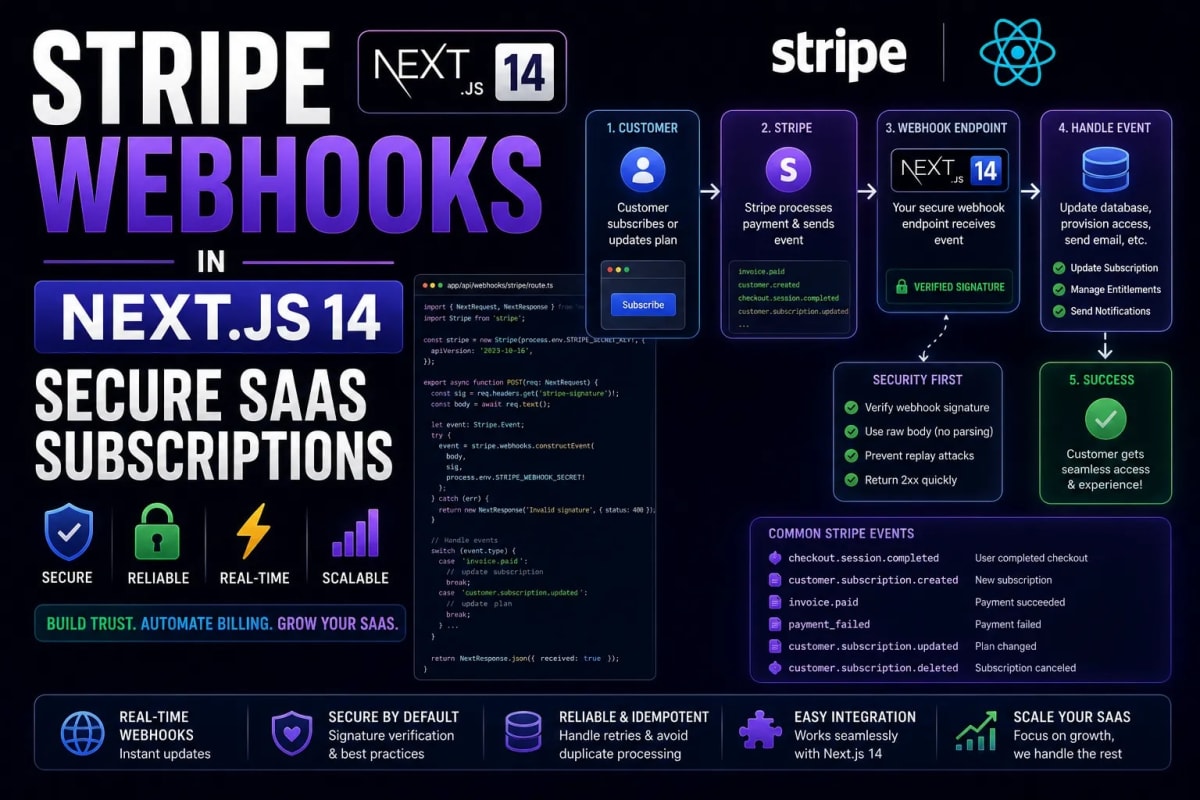
The Revenue Engine: Mastering Stripe Webhooks in Next.js 14
You can build the most beautiful, high-performance application in the world, but if you cannot securely process payments, you do not have a SaaS business; you have a free hobby. Integrating Stripe Checkout is relatively simple, but securely listening for asynchronous payment events like successful subscriptions, failed credit cards, or subscription cancellations requires architecting a flawless Webhook pipeline. In the Next.js 14 App Router, handling the raw webhook body to verify Stripe cryptographic signatures has changed drastically from the Pages router. In this engineering guide, we will build a zero-trust, mathematically secure Stripe Webhook endpoint.
Table of Contents
1. The Webhook Security Model (Why Signatures Matter)
2. Extracting the Raw Body in the App Router (Example)
3. Verifying the Stripe Cryptographic Signature (Example)
4. Processing the
checkout.session.completedEvent5. Local Testing with the Stripe CLI
1. The Webhook Security Model (Why Signatures Matter)
A webhook is just an open POST route (e.g., /api/webhooks/stripe) that listens for incoming data. Because this URL must be publicly accessible on the internet for Stripe to reach it, it is a prime target for hackers. A malicious actor could easily send a fake POST request to your webhook saying, "User 123 just paid $1000".
To prevent this, Stripe signs every webhook payload with a cryptographic hash (using a secret key only you and Stripe know) and sends it in the Stripe-Signature header. Your Next.js server must cryptographically reconstruct this signature. If the signatures match, the request is genuinely from Stripe. This is the exact same Zero-Trust philosophy we discussed in our Next.js 14 Server Actions Security Masterclass.
2. Extracting the Raw Body in the App Router
Here is the biggest trap in Next.js 14: By default, Next.js automatically parses incoming JSON payloads. However, to verify a cryptographic signature, Stripe requires the exact, raw string buffer of the request. Even a single missing space or converted character will break the signature verification.
In the App Router, we use the native Web Request API (req.text()) to extract this raw string without Next.js interfering. If you are handling thousands of these events per second, make sure your database connections are optimized. Read our guide on Scaling Next.js to 100k Concurrent Users to prevent webhook timeouts.
Example: The Route Handler Setup
// app/api/webhooks/stripe/route.ts
import { headers } from 'next/headers';
import { NextResponse } from 'next/server';
import Stripe from 'stripe';
import db from '@/lib/db'; // Your database connection

// Initialize Stripe securely
const stripe = new Stripe(process.env.STRIPE_SECRET_KEY!, {
  apiVersion: '2023-10-16',
});

const webhookSecret = process.env.STRIPE_WEBHOOK_SECRET!;

export async function POST(req: Request) {
  // 1. Extract the raw text body (Crucial for signatures)
  const body = await req.text();

  // 2. Get the Stripe signature header
  const signature = headers().get('Stripe-Signature') as string;

  let event: Stripe.Event;

  // We will verify the signature in the next step...
3. Verifying the Stripe Cryptographic Signature
Now that we have the raw body and the signature, we pass them to the Stripe SDK's constructEvent function. If a hacker tampers with the payload, this function will instantly throw an error, protecting your database from fake subscription upgrades.
When dealing with critical financial errors, standard console logs are not enough. You must implement advanced observability so your team is alerted instantly. Learn how to set this up in our Advanced Error Handling & Observability Guide.
Example: Constructing the Event
  try {
    // 3. Cryptographically verify the payload
    event = stripe.webhooks.constructEvent(body, signature, webhookSecret);
  } catch (err: any) {
    console.error(`⚠️ Webhook signature verification failed: ${err.message}`);
    // Return a 400 Bad Request to stop the process immediately
    return new NextResponse(`Webhook Error: ${err.message}`, { status: 400 });
  }
4. Processing the Subscription Events
Once the event is verified, Stripe will tell you exactly what happened. The most important event for a SaaS is checkout.session.completed. This means the user successfully entered their credit card and paid. You must extract their Customer ID and update your database to grant them Premium access.
If you are building a B2B platform, updating this access level might require purging the cache across multiple custom domains. We detailed this exact scenario in our Mastering Next.js revalidateTag Guide.
Example: Mutating the Database
  // 4. Handle specific event types
  try {
    switch (event.type) {
      case 'checkout.session.completed':
        const session = event.data.object as Stripe.Checkout.Session;

        // Extract metadata passed during checkout creation
        const userId = session.metadata?.userId;
        const stripeCustomerId = session.customer as string;

        // Mutate the database to grant premium status
        if (userId) {
          await db.user.updateOne(
            { id: userId },
            {
              isPremium: true,
              stripeCustomerId: stripeCustomerId
            }
          );
          console.log(`✅ User ${userId} upgraded to Premium.`);
        }
        break;

      case 'customer.subscription.deleted':
        // Handle cancellations here...
        break;

      default:
        console.log(`Unhandled event type: ${event.type}`);
    }

    // 5. Always return a 200 OK to Stripe so they don't retry the webhook
    return new NextResponse('Webhook processed successfully', { status: 200 });

  } catch (err) {
    console.error('Database mutation failed during webhook:', err);
    return new NextResponse('Internal Server Error', { status: 500 });
  }
}
5. Local Testing with the Stripe CLI
You cannot test webhooks easily on localhost:3000 because Stripe cannot send requests to your local laptop network. The industry standard solution is the Stripe CLI. By running a single command (stripe listen --forward-to localhost:3000/api/webhooks/stripe), Stripe creates a secure tunnel that forwards live test events directly to your local Next.js environment.
Once your billing system is functioning perfectly, your SaaS is ready to scale globally. If you plan to deploy your application to a massive audience, bypass expensive PaaS providers by following our Complete Docker & AWS Deployment Guide.
Conclusion: Protecting the Bottom Line
A reliable payment infrastructure is the backbone of any software business. By correctly extracting the raw body buffer, enforcing strict cryptographic signature verification, and safely mutating your database inside the Next.js 14 App Router, you eliminate the risk of subscription fraud. Treat your webhook endpoints with the same absolute security as your authentication system, and your revenue engine will run flawlessly.
Frequently Asked Questions
Why am I getting a 'No signatures found matching the expected signature' error?
This happens 99% of the time because you are passing a parsed JSON object to constructEvent instead of the raw text string. Ensure you are using await req.text() in Next.js 14 to grab the exact string buffer.
What happens if my Next.js server crashes during a webhook?
If your server returns a 500 error or times out, Stripe's retry logic will automatically attempt to resend the webhook event multiple times over the next few days. This is why your webhook logic must be idempotent (safe to run multiple times).
Should I use Server Actions for Webhooks?
No. Server Actions are designed exclusively for UI mutations submitted by the user's browser. Webhooks come from an external server (Stripe). You must use standard API Route Handlers (route.ts) for webhooks.
How do I pass my internal User ID to Stripe during checkout?
When creating the Stripe Checkout Session on your backend, pass your database's User ID into the metadata object. Stripe will include this exact metadata object inside the webhook payload when the payment completes.
Tagged in
Continue Reading
All Articles


Level Up Your Workflow
Free tools mentioned in this article
SQL Query Validator
Validate and format SQL queries instantly MySQL, PostgreSQL, SQLite & SQL Server. Free online SQL query checker with detailed error messages. No signup needed.
SVG Path Builder & Visualizer
An interactive, client-side SVG path builder and visualizer tool. Generate optimized cubic and quadratic Bezier vector code instantly on a grid canvas.
Robots.txt & LLMs.txt Generator
Generate robots.txt and llms.txt files instantly with AI bot presets for GPTBot, ClaudeBot, and PerplexityBot. Control who crawls your site in 2026.
Word & Character Counter
Free online word and character counter tool. Instantly calculate words, characters, sentences, and reading time for essays, social media, and SEO posts.