
Next.js 14 Error Handling & Observability: The Enterprise Guide
Author
Muhammad Awais
Published
May 17, 2026
Reading Time
7 min read
Views
19.9k
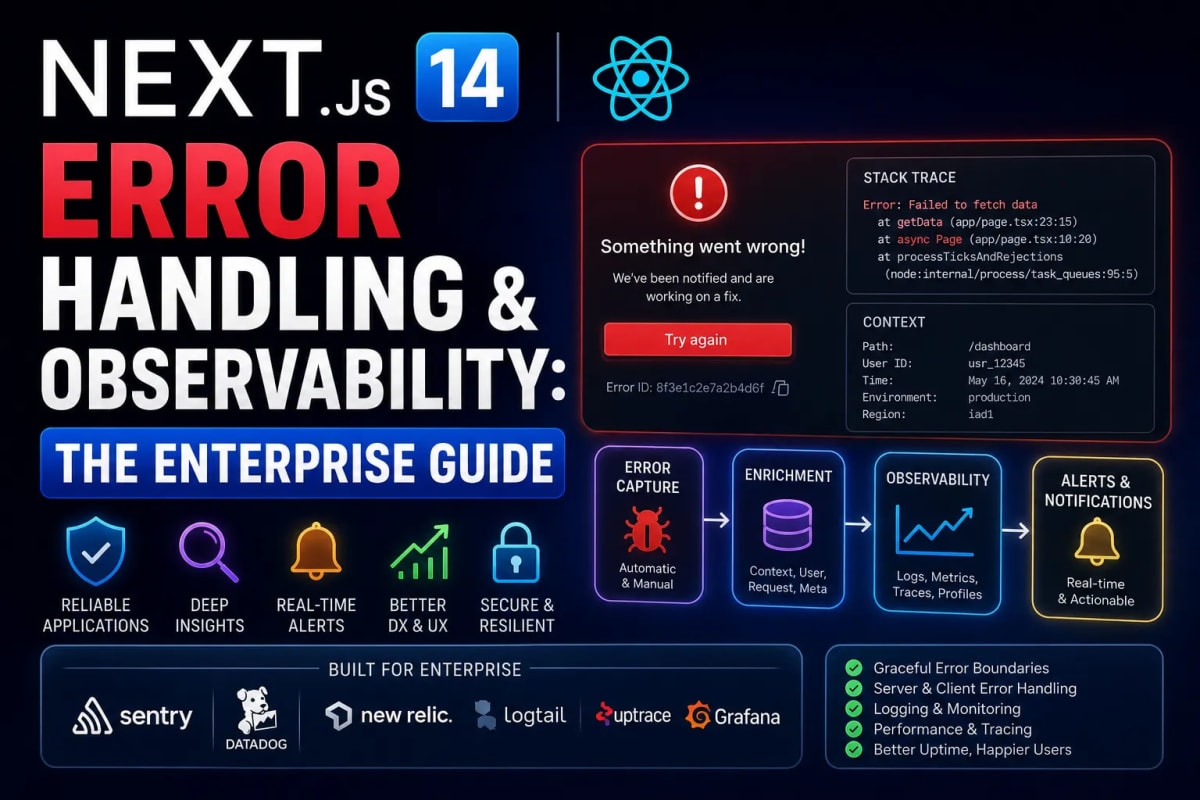
Stop Flying Blind: Advanced Error Handling & Observability in Next.js 14
In a local development environment, an error is a helpful red screen that tells you exactly what went wrong. In production, an unhandled error is a silent assassin. It manifests as a blank white screen, a frozen button, or a infinite loading spinner. By the time a user emails you to complain, you have already lost hundreds of potential customers. As applications scale, especially Multi-Tenant SaaS architectures, relying on console.log() is professional malpractice. In this masterclass, we will construct an enterprise-grade observability pipeline in the Next.js 14 App Router, utilizing nested error boundaries, safe Server Action mutations, and third-party telemetry.
Table of Contents
- 1. The App Router Error Hierarchy (
error.tsx) - 2. The Nuclear Option:
global-error.tsx - 3. Safe Server Actions: Expected vs Unexpected Errors
- 4. Handling 404s at Scale (Programmatic SEO)
- 5. Integrating Observability (Sentry Telemetry)
1. The App Router Error Hierarchy
Next.js 14 introduces a file-system-based approach to error handling using React Error Boundaries. When a Server Component fails to fetch data or crashes, the error "bubbles up" to the nearest error.tsx file in the folder directory. This prevents the entire application from crashing; only the specific segment fails, while the rest of the layout (like the sidebar and navbar) remains fully interactive.
This isolation is critical for maintaining Core Web Vitals. If an unhandled error freezes the main thread, it destroys your INP score. For a deeper understanding of main thread latency, review our guide on Fixing INP and Core Web Vitals.
Example: A Granular error.tsx Component
Notice that error.tsx must always be a Client Component because errors can happen on both the client and the server.
"use client"; // Error boundaries must be Client Components
import { useEffect } from "react";

export default function DashboardError({
  error,
  reset,
}: {
  error: Error & { digest?: string };
  reset: () => void;
}) {
  useEffect(() => {
    // Log the error to an observability service like Sentry
    console.error("Dashboard Segment Crashed:", error);
  }, [error]);

  return (
    <div class="p-6 border border-red-500 rounded-sm bg-red-50">
      <h2 class="text-red-700 font-bold">Failed to load dashboard data.</h2>
      <p class="text-sm text-red-600 mb-4">Error Hash: {error.digest}</p>
      <button
        onClick={() => reset()}
        class="px-4 py-2 bg-red-600 text-white rounded-sm hover:bg-red-700"
      >
        Try Again
      </button>
    </div>
  );
}
2. The Nuclear Option: global-error.tsx
Standard error.tsx files do not catch errors thrown inside the root app/layout.tsx or app/template.tsx. If your root layout crashes (for example, failing to fetch the global user session), the user will see a completely blank browser tab.
To catch root-level catastrophes, you must define a global-error.tsx file in the root of your app directory. Because it replaces the root layout when active, it must define its own <html> and <body> tags.
Example: The Root global-error.tsx
"use client";

export default function GlobalError({
  error,
  reset,
}: {
  error: Error & { digest?: string };
  reset: () => void;
}) {
  return (
    <html lang="en">
      <body class="flex items-center justify-center min-h-screen bg-zinc-950">
        <div class="text-center">
          <h1 class="text-3xl font-bold text-zinc-50">Critical System Failure</h1>
          <p class="text-zinc-400 mt-2">Our engineers have been notified.</p>
          <button onClick={() => reset()} class="mt-6 text-blue-500 underline">
            Reload Application
          </button>
        </div>
      </body>
    </html>
  );
}
3. Safe Server Actions: Expected vs Unexpected Errors
When dealing with Server Actions (mutations), there are two types of errors: Expected (validation failed, username taken) and Unexpected (database timeout). Throwing an actual JavaScript new Error() inside a Server Action will crash the UI. Instead, Server Actions should always return standardized object payloads.
We highly advise using Zod for validation, as detailed in our Next.js Server Actions Security Guide. Below is the ultimate pattern for safe server mutations.
Example: Try/Catch Pattern in Server Actions
"use server";
import { z } from "zod";
import db from "@/lib/db";

const Schema = z.object({ email: z.string().email() });

export async function subscribeUser(formData: FormData) {
  try {
    // 1. Expected Error: Validation Failure
    const parsed = Schema.safeParse({ email: formData.get("email") });
    if (!parsed.success) {
      return { status: "error", message: "Invalid email format." };
    }

    // 2. Database Operation
    await db.subscribers.create({ data: { email: parsed.data.email } });

    return { status: "success", message: "Subscribed successfully!" };

  } catch (error) {
    // 3. Unexpected Error: Database Crash / Timeout
    console.error("[CRITICAL] Failed to subscribe user:", error);

    // Do NOT return the raw error to the client (Security Risk)
    return {
      status: "error",
      message: "An internal server error occurred. Please try again later."
    };
  }
}
4. Handling 404s at Scale (Programmatic SEO)
A 404 Not Found is technically an error. If you are generating thousands of URLs dynamically (as taught in our Programmatic SEO Framework), some database records will inevitably be missing. If Next.js renders a broken page instead of a proper 404, Google will penalize your site for "Soft 404s".
Example: Forcing a 404 on Missing Data
import { notFound } from 'next/navigation';
import db from '@/lib/db';

export default async function ProductPage({ params }) {
  const product = await db.product.findById(params.id);

  // If data doesn't exist, immediately halt rendering and show not-found.tsx
  if (!product) {
    notFound();
  }

  return <div>{product.name}</div>;
}
5. Integrating Observability (Sentry Telemetry)
Printing to the Vercel console is fine for small apps, but enterprise teams use Telemetry tools like Sentry or Datadog. Sentry hooks directly into the Next.js build process and captures stack traces, performance bottlenecks, and the exact React Hydration Errors your users are experiencing in real-time.
To initialize Sentry in Next.js 14, you do not place it in layout.tsx. You must use Next.js's native instrumentation feature by creating an instrumentation.ts file in the root directory. This ensures the telemetry boots up before any other code runs.
Conclusion: Stability is a Feature
Users will forgive a lack of features, but they will never forgive a broken application. By implementing granular error boundaries, returning safe objects from Server Actions, and hooking into enterprise observability tools, you transition from being a reactive developer to a proactive architect. Stop waiting for bug reports. Log it, catch it, and fix it before the user even refreshes the page.
Frequently Asked Questions
Why doesn't error.tsx catch errors in my layout.tsx?
An error.tsx boundary wraps its nested children and the page.tsx file. It does not wrap the layout.tsx file in the same segment. To catch layout errors, you must rely on the error.tsx in the parent folder, or global-error.tsx for the root layout.
Can I trigger an error boundary manually?
Yes. If you encounter a logical error (e.g., an API returns a 500 status code) inside a Server Component, you can simply write throw new Error("Failed to fetch"). Next.js will automatically catch this and render the nearest error.tsx.
What does the 'digest' property on the error object mean?
The digest is an automatically generated hash of the error created by Next.js. You can use this hash to cross-reference the error displayed on the user's client with the exact stack trace logged securely on your Vercel/Node server logs.
Should I use 'try/catch' inside Server Components?
Usually, no. It is better to let the error throw and allow the error.tsx boundary to handle the UI fallback. Using too many try/catch blocks in Server Components leads to fragmented, hard-to-maintain code. Let the framework handle the error state visually.
Does Sentry slow down my Next.js app performance?
If configured correctly with next.config.js injection, the performance impact is negligible. Sentry primarily runs its heaviest logic asynchronously on the server and edge, minimizing the bundle weight sent to the client's browser.
Tagged in
Continue Reading
All Articles

Level Up Your Workflow
Free tools mentioned in this article
PX to EM Converter
Convert pixels to em and em to px with customizable parent font size. Free, instant, local calculation, copy-ready CSS snippets & Tailwind classes.
JSON to TypeScript Converter
Convert any JSON object into clean TypeScript interfaces instantly. Supports nested objects, arrays, and optional fields free, no signup, runs entirely in your browser.
LLM API Cost Calculator
Compare LLM API pricing across 18 models GPT-4o, Claude Sonnet 4, Gemini 2.5 Pro, DeepSeek, Mistral and more. Calculate monthly API costs, count tokens live, and convert to 7 currencies. Free, instant, no signup.
Word & Character Counter
Free online word and character counter tool. Instantly calculate words, characters, sentences, and reading time for essays, social media, and SEO posts.