
Node.js Performance: Worker Threads & Event Loop
Author
Muhammad Awais
Published
May 17, 2026
Reading Time
9 min read
Views
31.6k
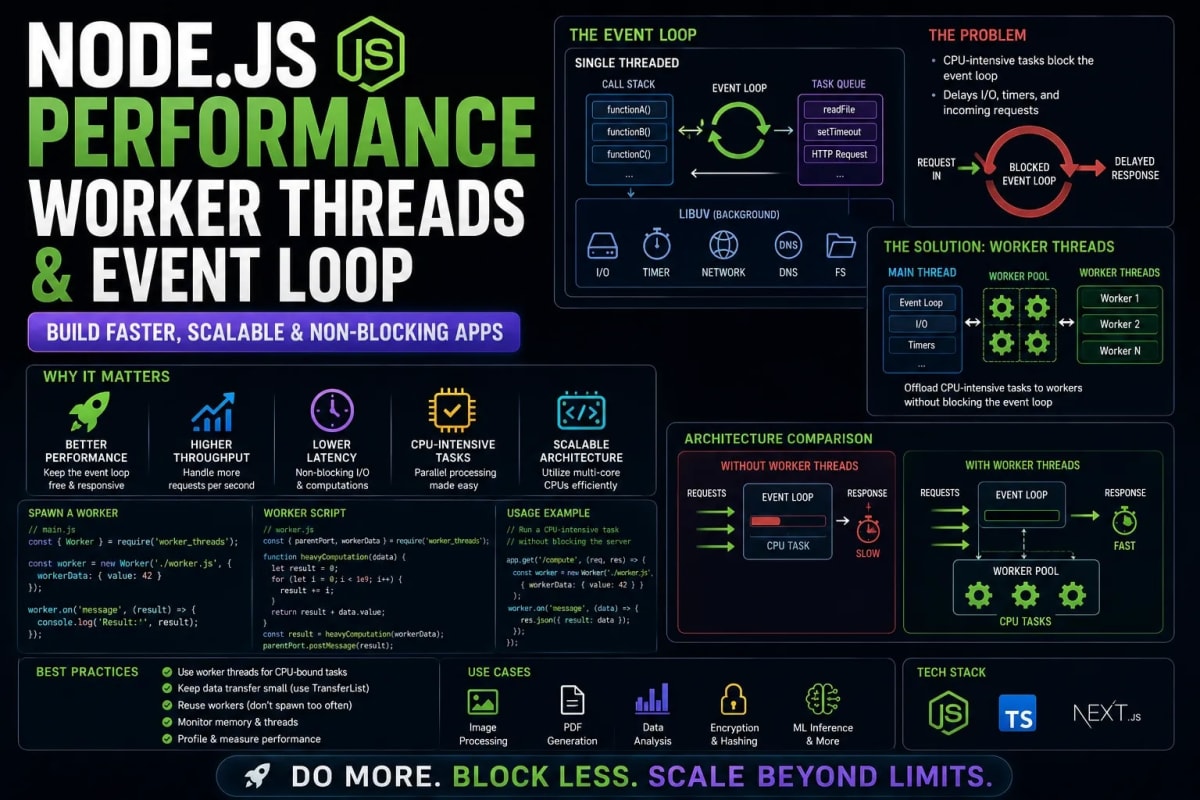
The Node.js Performance Crisis: Mastering the Event Loop & Worker Threads
Node.js revolutionized backend engineering by allowing developers to use JavaScript on the server. Its non-blocking, asynchronous architecture is legendary for handling thousands of concurrent network requests. However, this architectural superpower is also its greatest fatal flaw. Node.js operates on a Single Thread. While it is incredibly fast at waiting for databases or network calls, it is catastrophically bad at heavy mathematical computations. A single poorly written regular expression or a heavy JSON payload can completely freeze your server, locking out every other user currently connected. In 2026, building an enterprise MERN application requires moving beyond basic CRUD operations. In this deep-dive engineering masterclass, we will dissect the Node.js Event Loop, identify silent performance killers, and architect multi-threaded solutions using Worker Threads and Redis Message Queues.
Table of Contents
- 1. Deconstructing the V8 Engine and Libuv
- 2. The Silent Killer: Blocking the Main Thread
- 3. Multi-Threading in Node: The Worker Threads API
- 4. Implementing a Worker Thread Pool (Code Example)
- 5. Offloading Workloads with Redis & BullMQ
- 6. Memory Leaks and Production Observability
1. Deconstructing the V8 Engine and Libuv
To optimize Node.js, you must understand its anatomy. Node.js is primarily composed of two C++ libraries: the V8 Engine (built by Google to execute JavaScript) and Libuv (a multi-platform support library with a focus on asynchronous I/O).
When a user requests data from your API, V8 executes the JavaScript code. If the code requires reading a file or querying a database, V8 does not sit and wait. It hands the task over to Libuv. Libuv actually maintains a hidden pool of C++ threads (typically 4 threads by default) running in the background. Libuv handles the slow database query while V8 immediately moves on to serve the next user. When Libuv finishes the database query, it places the result in the Event Queue, and the Event Loop eventually pushes it back to V8 to execute the callback.
This is why Node.js is "Non-Blocking" for I/O tasks. It is perfectly designed for high-concurrency web servers. If you are building an architecture to handle massive traffic spikes, integrating this non-blocking nature with Edge infrastructure is crucial. You can read more about handling traffic limits in our 100k Concurrent Users Scaling Architecture Guide.
2. The Silent Killer: Blocking the Main Thread
The illusion of infinite concurrency breaks the moment you introduce CPU-bound tasks. Because V8 only has ONE main thread to execute JavaScript, any mathematical calculation, cryptographic hashing, massive array sorting, or synchronous file reading will "block" that thread.
Imagine you have an endpoint that generates a massive PDF report from database records. If generating the PDF takes 5 seconds of pure JavaScript execution time, the V8 engine is locked for 5 seconds. If 1,000 other users try to load your simple homepage during those 5 seconds, they will all receive a spinning loading wheel until the PDF finishes. This phenomenon destroys user experience and is the primary reason teams mistakenly abandon Node.js for Go or Rust.
Example: A Catastrophic Blocking Endpoint
const express = require('express');
const crypto = require('crypto');
const app = express();

// A fast, non-blocking route
app.get('/health', (req, res) => {
  res.send('Server is healthy!');
});

// A malicious, thread-blocking route
app.get('/generate-hash', (req, res) => {
  // pbkdf2Sync is synchronous. It locks the V8 Engine.
  // If this takes 3 seconds, the '/health' route will also stop responding!
  const hash = crypto.pbkdf2Sync('secret_password', 'salt', 10000000, 64, 'sha512');
  res.send(`Hash generated: ${hash.toString('hex')}`);
});

app.listen(8080);
3. Multi-Threading in Node: The Worker Threads API
For years, the only way to bypass the single-thread limitation was to spin up entirely new Node.js processes using the cluster module. While effective, processes consume massive amounts of RAM and cannot share memory easily.
Enter the Worker Threads API (worker_threads). Introduced natively in modern Node.js, Worker Threads allow you to spawn multiple isolated V8 engines within the SAME parent process. They share the same memory space (via SharedArrayBuffer) but execute JavaScript in parallel. If you are deploying your Node.js application to multi-core cloud servers—such as an AWS EC2 instance orchestrated via our Docker & AWS Deployment Framework—Worker Threads allow you to finally utilize 100% of your available CPU cores.
4. Implementing a Worker Thread Pool
Creating a Worker Thread is straightforward, but constantly spinning them up and tearing them down introduces overhead. The enterprise solution is to create a Worker Pool. A pool boots up a set number of threads (usually matching your server's CPU core count) and keeps them alive, feeding them tasks as they come in.
Example: Offloading CPU Work to a Worker
First, we create the worker file (worker.js) which will run on a separate CPU thread.
// worker.js
const { parentPort } = require('worker_threads');

// Listen for messages from the main thread
parentPort.on('message', (taskData) => {
  // Perform heavy CPU calculation (e.g., Image Processing, PDF generation)
  let result = 0;
  for (let i = 0; i < taskData.iterations; i++) {
    result += Math.sqrt(i);
  }

  // Send the result back to the main thread
  parentPort.postMessage({ status: 'success', result });
});
Next, we execute this worker from our main Express.js application without blocking the Event Loop.
// main.js
const express = require('express');
const { Worker } = require('worker_threads');
const app = express();

app.get('/heavy-task', (req, res) => {
  // Spin up a worker thread
  const worker = new Worker('./worker.js');

  // Send data to the worker
  worker.postMessage({ iterations: 5000000000 });

  // Listen for the result asynchronously
  worker.on('message', (msg) => {
    res.send(`Task completed on a background thread: ${msg.result}`);
  });

  worker.on('error', (err) => {
    res.status(500).send('Worker thread crashed.');
  });
});

app.listen(8080, () => console.log('Main thread is secure and non-blocking!'));
5. Offloading Workloads with Redis & BullMQ
Worker threads are perfect for synchronous mathematical tasks (like cryptography or parsing massive CSVs). However, what if your heavy task involves third-party APIs, database transactions, or sending 10,000 emails? In these cases, you do not want to use Worker Threads. You want to use a Distributed Message Queue.
Using Redis combined with a library like BullMQ allows you to completely decouple heavy background jobs from your user-facing API. When a user uploads a video to be compressed, your API simply pushes a job into the Redis queue and immediately returns a 202 Accepted response to the user. A completely separate fleet of Node.js background servers listens to that queue and processes the video at their own pace.
This architecture is mandatory for processing highly critical asynchronous tasks, such as handling financial events. If you are integrating monetization, we strongly advise reading our Guide to Mastering Stripe Webhooks, where queueing background events prevents data loss. Furthermore, this decoupled architecture allows you to scale your web servers and your background worker servers independently, maximizing your database pooling efficiency as taught in our Prisma & PostgreSQL Connection Pooling Architecture.
Example: Producing and Consuming Redis Jobs
// 1. The Producer (Your Main Web API)
const { Queue } = require('bullmq');

// Connect to Redis
const videoQueue = new Queue('VideoProcessing', {
  connection: { host: 'localhost', port: 6379 }
});

app.post('/upload', async (req, res) => {
  // Push job to Redis and immediately respond to user
  await videoQueue.add('compress-video', { videoId: 'vid_123', format: 'mp4' });
  res.status(202).send({ message: 'Video is processing in the background.' });
});

// 2. The Consumer (A Separate Background Node.js Process)
const { Worker } = require('bullmq');

const videoWorker = new Worker('VideoProcessing', async (job) => {
  console.log(`Starting heavy compression for ${job.data.videoId}`);
  // Await heavy FFmpeg processing here...
  await compressVideo(job.data);
  console.log('Video compression complete!');
}, { connection: { host: 'localhost', port: 6379 } });
6. Memory Leaks and Production Observability
As you introduce Worker Threads and Redis queues, your backend architecture becomes significantly more complex. The most common critical failure in advanced Node.js applications is not CPU blocking, but Memory Leaks. Because Node.js utilizes Garbage Collection, if you accidentally keep references to large objects (like storing raw file buffers in global variables), the Garbage Collector cannot free up the RAM. Eventually, your Docker container will hit its memory limit and crash with an OOM (Out Of Memory) error.
You cannot fix what you cannot measure. Enterprise Node.js deployments must integrate APM (Application Performance Monitoring) tools. To ensure your distributed architecture remains stable and you are instantly alerted to memory spikes, review our masterclass on Advanced Error Handling and Observability with Sentry.
Conclusion: Mastering the JavaScript Backend
Node.js is not just a tool for building simple REST APIs; it is a high-performance engine capable of enterprise scale. By understanding the mechanics of the V8 Event Loop, actively identifying synchronous thread-blocking code, implementing Worker Threads for CPU-bound math, and utilizing Redis for distributed background jobs, you unlock the true power of backend JavaScript. Write code that respects the single thread, and your servers will handle millions of requests without breaking a sweat.
Frequently Asked Questions
Does async/await prevent blocking the main thread?
No! This is a very common misconception. await only yields control back to the Event Loop if it is waiting for an I/O operation (like a network request). If you put a heavy for-loop inside an async function, it will still 100% block the V8 main thread.
When should I use Worker Threads vs Child Processes?
Use Child Processes (child_process) if you need to run completely different applications or execute shell commands (like running a Python script). Use Worker Threads (worker_threads) when you want to execute heavy JavaScript code within the same application, as they are lighter and can share memory safely.
Are Serverless functions (AWS Lambda/Vercel) affected by the Event Loop?
Yes. Even though serverless spins up isolated instances for each user, if your function contains heavy CPU-blocking code, that specific user's request will take significantly longer to execute. Since cloud providers bill you by the millisecond of execution time, blocking the thread literally costs you money.
What is the difference between Redis Queues (BullMQ) and Kafka?
Redis/BullMQ is a job queue. It is designed to execute a task once and report success/failure. Kafka is an event-streaming platform. It is designed to broadcast a continuous stream of data (like user analytics or stock prices) to multiple different microservices simultaneously.
How do I detect if my Node.js app is blocking the thread?
You can use the built-in perf_hooks module to monitor Event Loop lag. Alternatively, professional tools like Datadog or New Relic will automatically flag endpoints where the CPU utilization hits 100% while the I/O operations are zero.
Tagged in
Continue Reading
All Articles

Level Up Your Workflow
Free tools mentioned in this article
Regex Tester & Debugger
Test, debug, and validate JavaScript regular expressions instantly. Live match highlighting, capture groups, all flags supported - free, client-side, zero logs.
HTTP Status Code Lookup
Look up any HTTP status code instantly 1xx to 5xx, Cloudflare codes, WebDAV, with JS/Next.js handling examples. Free, no signup.
Word & Character Counter
Free online word and character counter tool. Instantly calculate words, characters, sentences, and reading time for essays, social media, and SEO posts.
Fancy Font & Stylish Text Generator
Transform your text into 50+ stylish and aesthetic fonts instantly. Perfect for Instagram bios, TikTok captions, and PUBG nicknames. One-click copy & paste.