
Next.js Prisma & PostgreSQL: Serverless DB Pooling
Author
Muhammad Awais
Published
May 17, 2026
Reading Time
10 min read
Views
30k
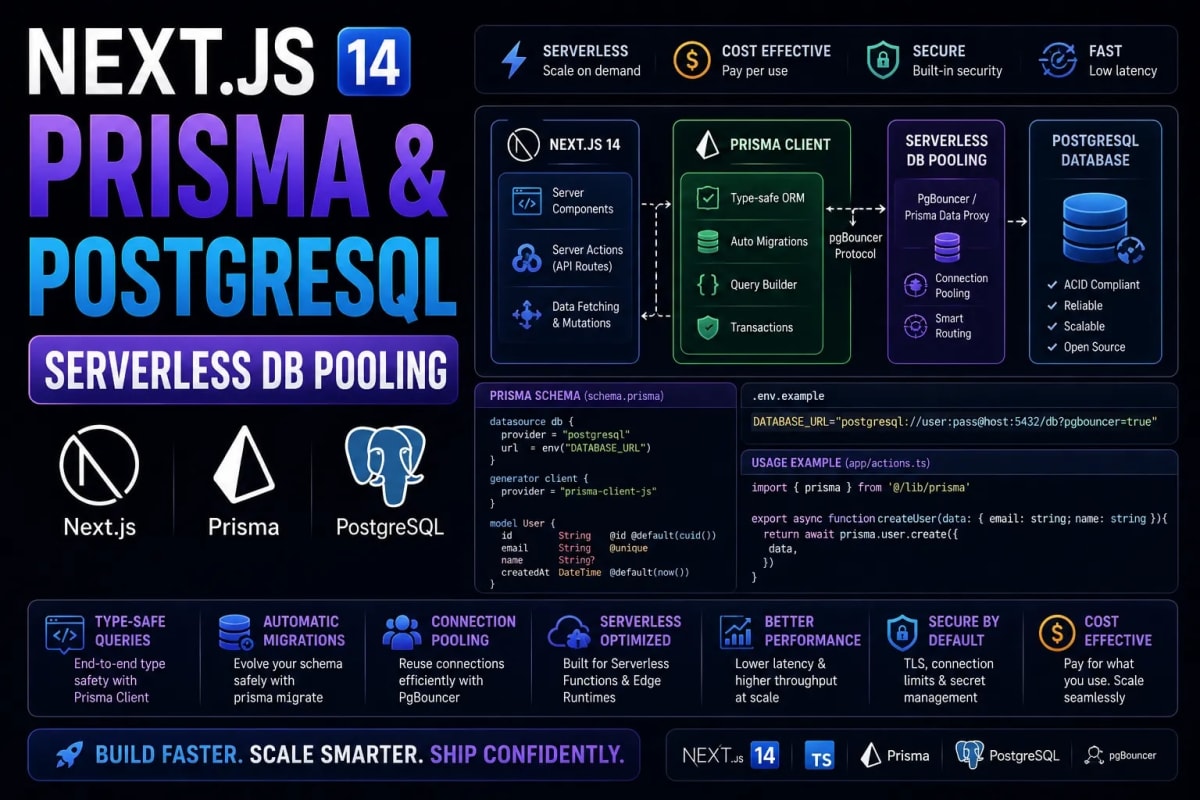
The Serverless Database Crisis: Mastering Prisma & PostgreSQL in Next.js 14
Deploying a Next.js 14 application to a serverless environment like Vercel or AWS Lambda feels like magic until your traffic spikes. Suddenly, your users are greeted with a terrifying 500 Internal Server Error, and your database logs scream: "FATAL: sorry, too many clients already". This is the serverless connection exhaustion crisis. Unlike traditional Node.js servers that maintain a single, steady connection pool to PostgreSQL, serverless functions create and destroy hundreds of micro-environments per second. Each invocation aggressively opens a new TCP connection to your database, instantly overwhelming its connection limit. In this definitive, deep-dive engineering guide, we will architect a resilient PostgreSQL connection pooling strategy using Prisma in Next.js 14, guaranteeing zero database timeouts even under massive viral traffic.
Table of Contents
- 1. The Anatomy of a TCP Connection & Serverless Cold Starts
- 2. Why the Default Prisma Client Fails in Serverless
- 3. The Global Singleton Pattern (Fixing Development Hot-Reloads)
- 4. PgBouncer: The Enterprise Connection Proxy
- 5. Prisma Accelerate & The Edge Runtime Solution
- 6. Safely Mutating Data After Connection Optimization
1. The Anatomy of a TCP Connection & Serverless Cold Starts
To understand the problem, you must first understand how databases communicate over the internet. Connecting to a PostgreSQL database is not a lightweight operation. It requires a multi-step TCP handshake, SSL/TLS cryptographic negotiation, and authentication query verification. In a traditional, long-running Express.js server, this expensive handshake happens exactly once when the server boots. The server then holds a "pool" of 10 to 20 open connections and reuses them for every incoming user request.
Serverless architecture destroys this paradigm. When you deploy a Next.js App Router application to Vercel, every API route or Server Action is compiled into an isolated AWS Lambda function. If 1,000 users visit your site simultaneously, Vercel spins up 1,000 separate Lambda functions. Because these functions do not share memory, each function initiates its own expensive TCP handshake with your database. If your PostgreSQL database has a maximum connection limit of 100 (which is standard for $20-$50 cloud databases), the 101st user will crash the system.
This connection exhaustion is the number one reason why startups fail on launch day. If you are serious about architecting a zero-latency scaling architecture for 100k concurrent users, you cannot rely on direct database connections. You must introduce an intermediary layer.
2. Why the Default Prisma Client Fails in Serverless
Prisma is arguably the most powerful Type-Safe ORM available for Node.js and Next.js developers today. However, its default instantiation method is highly dangerous in modern full-stack frameworks.
Most junior developers instantiate Prisma like this: const prisma = new PrismaClient() inside their route handlers or layout files. Every time that specific file is executed, a brand new instance of the Prisma engine is booted into memory, and a new database connection is forged. In a highly dynamic environment, this leads to aggressive memory leaks and immediate connection pool depletion. Furthermore, this problem is magnified tenfold during local development, leading us to our first critical architectural fix.
3. The Global Singleton Pattern (Fixing Development Hot-Reloads)
Before addressing production scaling, we must fix the local development environment. Next.js relies on Hot Module Replacement (HMR) to instantly update your browser when you save a file. However, every time HMR triggers, Next.js clears the Node.js cache and re-evaluates your files. If you have a standard new PrismaClient() initialization, HMR will create a new connection to your local database on every file save, eventually locking you out of your own local PostgreSQL instance.
To prevent this, we must utilize the Node.js globalThis object. The global object is not affected by Next.js HMR cache clearing. By checking if a Prisma instance already exists on the global object before creating a new one, we mathematically guarantee that only one Prisma connection exists during development.
Code Example: The Enterprise Prisma Singleton
// src/lib/prisma.ts
import { PrismaClient } from '@prisma/client';

// Prevent multiple instances of Prisma Client in development
declare global {
  var prisma: PrismaClient | undefined;
}

// Instantiate Prisma with optimized connection parameters
const prismaOptions = {
  log: process.env.NODE_ENV === 'development' ? ['query', 'error', 'warn'] : ['error'],
};

export const prisma =
  global.prisma ||
  new PrismaClient(prismaOptions);

if (process.env.NODE_ENV !== 'production') {
  global.prisma = prisma;
}

export default prisma;
This simple pattern acts as your first line of defense. However, while it solves the local development crisis, it does not solve the serverless multi-container crisis in production. For that, we must look outside the Node.js ecosystem and into database infrastructure.
4. PgBouncer: The Enterprise Connection Proxy
If 1,000 serverless functions want to connect to a database that only accepts 100 connections, you need a bouncer at the door. In the PostgreSQL ecosystem, this bouncer is literally called PgBouncer. PgBouncer is a lightweight connection pooler that sits directly in front of your PostgreSQL database.
Instead of your Next.js application connecting to PostgreSQL, it connects to PgBouncer. PgBouncer accepts all 1,000 incoming TCP connections instantly (because it is extremely lightweight), but it only opens 100 actual connections to the real database. It then intelligently multiplexes (queues and routes) the incoming queries through those 100 active pipes.
If you are deploying your own infrastructure, setting up PgBouncer inside a Docker container is mandatory. You can learn the exact steps for orchestrating this in our Docker and AWS ECR deployment guide. When using Prisma with PgBouncer, you must use the `pgbouncer=true` parameter in your database URL, and ensure PgBouncer is running in "Transaction Mode", which allows different serverless functions to share the same physical connection sequentially.
Code Example: Prisma Schema with PgBouncer
// schema.prisma
datasource db {
  provider  = "postgresql"
  // The connection pooling URL (points to PgBouncer)
  url       = env("DATABASE_URL")
  // The direct URL (required for Prisma migrations)
  directUrl = env("DIRECT_URL")
}

generator client {
  provider = "prisma-client-js"
}

// .env
# Application connects through the pooler
DATABASE_URL="postgres://user:pass@pgbouncer-host:6432/mydb?pgbouncer=true"

# Migrations must bypass the pooler directly to the DB
DIRECT_URL="postgres://user:pass@actual-db-host:5432/mydb"
5. Prisma Accelerate & The Edge Runtime Solution
Maintaining your own PgBouncer infrastructure requires significant DevOps expertise. If you prefer a fully managed solution, the team behind Prisma has created Prisma Accelerate. This is a globally distributed connection pool and caching layer designed specifically for serverless and Edge environments.
Because the Next.js Edge Runtime (used in Edge Middleware) does not support native TCP sockets, traditional database connections fail entirely at the Edge. Prisma Accelerate converts your standard TCP database queries into standard HTTP requests. HTTP requests are stateless, meaning connection pooling issues are bypassed entirely, allowing you to query your PostgreSQL database directly from a Next.js Edge Middleware function operating in a data center 10 miles from your user.
This HTTP-based approach is incredibly powerful for globally distributed SaaS applications. However, be mindful that converting queries to HTTP introduces a slight serialization overhead. You must balance the infinite scalability of HTTP pooling with the raw millisecond speed of direct TCP connections depending on your application's specific read/write ratio.
6. Safely Mutating Data After Connection Optimization
Once your database connection architecture is flawless, your server will be able to handle thousands of requests per second. However, speed without security is a liability. Handling massive volumes of data mutations (POST/PUT requests) in Next.js 14 requires stringent validation.
Never trust raw JSON payloads sent from the client. Every incoming mutation must be parsed through a strict schema validation library like Zod. Furthermore, mutating data safely requires strict Server Actions security protocols to prevent Cross-Site Request Forgery (CSRF) and Broken Object Level Authorization (BOLA).
Code Example: High-Performance Safe Mutation
"use server";
import { prisma } from "@/lib/prisma";
import { revalidateTag } from "next/cache";
import { z } from "zod";

const UpdateUserSchema = z.object({
  id: z.string().uuid(),
  name: z.string().min(2).max(50),
});

export async function updateUserName(formData: FormData) {
  try {
    // 1. Mathematically validate the payload
    const parsed = UpdateUserSchema.safeParse({
      id: formData.get("id"),
      name: formData.get("name"),
    });

    if (!parsed.success) throw new Error("Invalid input format.");

    // 2. Execute the mutation using the pooled Prisma singleton
    const updatedUser = await prisma.user.update({
      where: { id: parsed.data.id },
      data: { name: parsed.data.name },
    });

    // 3. Purge the specific UI cache dynamically
    revalidateTag(`user-${updatedUser.id}`);

    return { success: true, user: updatedUser };
  } catch (error) {
    console.error("Mutation Failed:", error);
    return { success: false, error: "Failed to update profile." };
  }
}
Notice step 3 in the code above. After the database is successfully mutated, we must purge the Next.js Data Cache to ensure the UI updates instantly for the user. Relying on time-based revalidation will lead to user frustration and frontend state bugs that are as notoriously difficult to debug as React hydration errors. For a complete understanding of how to manage cache tagging effectively, read our masterclass on Next.js revalidateTag and revalidatePath.
Conclusion: Engineering Serverless Reliability
The transition from a traditional monolithic server to a serverless Next.js architecture requires a fundamental shift in how we manage database connections. By treating TCP connections as expensive, exhaustible resources, implementing the Global Singleton pattern, and routing traffic through connection poolers like PgBouncer or Prisma Accelerate, you bulletproof your backend. A scalable application is not built by writing faster code; it is built by engineering resilient infrastructure that refuses to crash, no matter how viral the traffic gets.
Frequently Asked Questions
Why do I need a separate DIRECT_URL for Prisma Migrations?
Prisma migrations (running npx prisma migrate deploy) require a persistent, uninterrupted connection to the database to alter tables and schemas. PgBouncer's transaction pooling mode constantly rotates connections, which will instantly cause your migration scripts to crash. Always bypass the pooler for structural database changes.
Can I use Supabase with Prisma in Next.js?
Yes, Supabase natively uses PostgreSQL and is highly compatible with Prisma. More importantly, Supabase provides an out-of-the-box PgBouncer connection pooler on port 6543 (as opposed to the direct port 5432). You simply use this pooled URL in your DATABASE_URL env variable.
Does Vercel Postgres require Prisma Accelerate?
No. Vercel Postgres is built on top of Neon (a serverless Postgres provider). Neon handles connection pooling automatically under the hood via websockets. You can connect to it securely without needing additional poolers, though caching tools like Accelerate can still improve read performance.
What is the difference between Session Mode and Transaction Mode in PgBouncer?
Session mode holds the database connection for the entire lifecycle of a client's session, which defeats the purpose of serverless pooling. Transaction mode releases the database connection back to the pool the exact millisecond a SQL transaction completes, making it the mandatory choice for Next.js App Router scale.
How do I test my connection limit locally?
Testing connection drops locally is difficult. However, you can use professional load testing tools like Artillery or K6. Run a script that simulates 500 concurrent requests to a specific Next.js API route that reads from the database. If it is un-pooled, you will immediately see 500 status codes in your terminal.
Tagged in
Continue Reading
All Articles
Level Up Your Workflow
Free tools mentioned in this article
SQL Query Validator
Validate and format SQL queries instantly MySQL, PostgreSQL, SQLite & SQL Server. Free online SQL query checker with detailed error messages. No signup needed.
JWT Decoder & Verifier
Decode, parse, and verify JWT (JSON Web Tokens) securely in your browser. Validate claims and debug authentication payloads instantly with zero server logs.
Image Resizer & Compressor
Compress image to 20KB, 50KB, or 100KB online free instantly reduce image size in KB for government forms, exams (UPSC, SSC, FPSC, NTS), passport photos, and more. Works entirely in your browser.
HTTP Status Code Lookup
Look up any HTTP status code instantly 1xx to 5xx, Cloudflare codes, WebDAV, with JS/Next.js handling examples. Free, no signup.