
How to Build a Multi-Agent AI System with LangGraph and Node.js in 2026
Author
Muhammad Awais
Published
May 20, 2026
Reading Time
13 min read
Views
18.7k
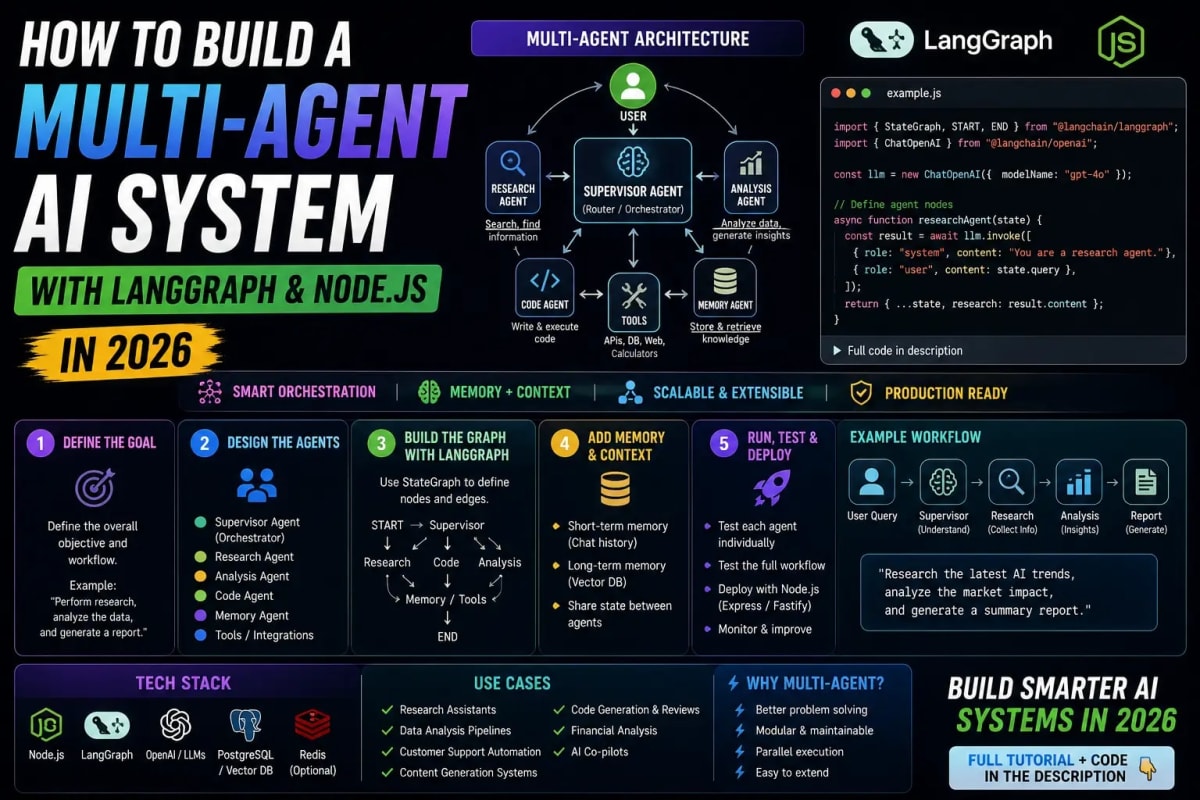
Single-agent AI systems hit a ceiling fast. One LLM call, one tool, one task it works for demos but falls apart the moment a real workflow requires research, decision branching, memory across steps, and parallel execution. Multi-agent systems are the answer, and LangGraph is currently the most production-ready framework for building them in JavaScript and TypeScript. This guide walks through the core concepts, the architecture decisions that actually matter, and the complete pattern for wiring a multi-agent system in Node.js that you can ship and maintain.
What LangGraph Actually Is and What It Is Not
LangGraph is a library for building stateful, graph-based AI workflows. The core abstraction is a directed graph where each node is a function typically one that calls an LLM, runs a tool, or routes to another node and edges define the flow between them, including conditional branching based on the current state. The graph maintains a shared state object that every node can read and write to, which is what makes multi-step agentic behavior coherent across many LLM calls.
LangGraph is not a higher-level AI framework that abstracts away the LLM. It does not pick your model, manage your prompts, or handle your API keys. It is specifically the orchestration layer the thing that decides which agent runs next, what state it receives, and how the output feeds into the next step. This narrow focus is why it composes well with everything else in the stack.
It is also worth being clear about what distinguishes a LangGraph system from a simple chain of LLM calls. A chain is linear step one feeds step two feeds step three. A LangGraph system is cyclic and conditional. A node can loop back to a previous node, hand off to a different agent based on what it found, or run multiple branches in parallel. That structural difference is what enables genuinely complex agentic behavior rather than scripted sequential processing.
The Three Building Blocks: Nodes, Edges, and State
Every LangGraph application is built from these three primitives, and understanding them precisely makes the rest of the architecture obvious.
State is a typed object that persists across the entire graph execution. Every node receives the current state and returns a partial update to it. LangGraph merges these updates using reducers you define the default is last-write-wins, but for lists like message histories, you typically use an append reducer so messages accumulate rather than overwrite. Defining your state schema carefully is the most important architectural decision in a LangGraph project. Sloppy state design fields with unclear ownership, mutable nested objects without reducers creates bugs that are genuinely hard to trace.
Nodes are async functions. They receive the current state, do something call an LLM, invoke a tool, run a database query and return an object containing the state fields they want to update. The function signature is always async (state: YourStateType) => Partial<YourStateType>. Keeping nodes focused on a single responsibility makes the graph readable and the nodes independently testable.
Edges connect nodes and control flow. A normal edge always moves from node A to node B. A conditional edge runs a router function against the current state and returns the name of the next node to execute. The router is pure it inspects state and returns a string. This separation of routing logic from node logic is what keeps complex graphs manageable: your agents do not decide where to go next; the router does, based on what they produced.
Designing the Supervisor Pattern for Multi-Agent Systems
The most reliable multi-agent architecture in LangGraph is the supervisor pattern. One node acts as the supervisor it receives the user's task, decides which specialist agent to delegate to, and receives the result. The specialist agents are themselves nodes in the graph, each focused on a narrow capability: web search, code execution, database querying, document analysis. The supervisor routes between them based on what the task requires and what has already been completed.
The supervisor is typically an LLM call with a structured output that returns either the name of the next agent to invoke or a terminal signal indicating the task is complete. The conditional edge reads this output and routes accordingly. This gives you a loop: supervisor decides, agent executes, result updates state, supervisor decides again. The loop continues until the supervisor signals completion or a maximum step count is reached always set a maximum step count.
The alternative to the supervisor pattern is a peer-to-peer architecture where agents hand off directly to each other. This works for simpler linear workflows but becomes difficult to debug and reason about as complexity grows because any agent can route to any other agent. The supervisor pattern keeps routing logic in one place, which is worth the added latency of the extra LLM call per cycle for any system you plan to maintain. For a deeper look at how agentic architectures are structured conceptually, our guide to autonomous AI agents and agentic workflows covers the mental models behind these design choices.
One nuance that trips up intermediate developers: the supervisor does not need to re-read the full conversation history to make routing decisions. Pass it a summary of what has been done and what the current goal is. Full history injection into every supervisor call is one of the most common sources of token waste and context window overflow in production multi-agent systems.
Wiring Tools and Function Calling Into Agent Nodes
Each specialist agent node in your graph typically binds a set of tools functions the LLM can invoke to take action in the world. In LangGraph's Node.js implementation, you define tools as objects with a name, description, and input schema, then pass them to the LLM's tool-calling interface. The node runs the LLM call, checks if the response includes a tool call, executes the tool, feeds the result back to the LLM, and loops until the LLM produces a final text response rather than another tool call.
This inner tool-calling loop within a single agent node is the reason LangGraph nodes need to be async and why the state update they return may come after multiple LLM round trips. The node is responsible for resolving its own tool calls before returning control to the graph. If you let the graph manage individual tool calls as separate nodes, you end up with an explosion of nodes that makes the graph hard to read without adding clarity. For complex tool implementations including error handling and retry logic, our guide on building autonomous AI agents in Node.js with function calling covers the implementation details at a low level.
Tool error handling is non-negotiable in production. An agent node that throws when a tool fails will crash the graph execution. Always wrap tool calls in try-catch, return a structured error object as the tool result, and let the LLM decide whether to retry with different parameters, try an alternative tool, or escalate to the supervisor. A graph that handles tool failures gracefully is the difference between a demo and a deployed system.
Adding Memory: Short-Term Context and Long-Term Retrieval
Memory in multi-agent systems has two distinct layers and they need different solutions. Short-term memory is the conversation and task history within a single graph execution this lives in your state object as a message array and is automatically available to every node that reads state. The challenge is managing its size: a long-running agent loop accumulates a large message history that eventually exceeds the context window or becomes expensive. Summarization nodes nodes that condense history before it is passed to the next agent are the standard solution.
Long-term memory is anything that needs to persist across separate graph executions user preferences, past task outcomes, retrieved documents, learned facts. This lives outside the graph in a vector database or key-value store and is injected into agent nodes via retrieval calls. A research agent that retrieves relevant past findings before starting a new search produces significantly better results than one that starts from scratch every time. The architecture for connecting a vector store to your agent nodes is exactly the pattern covered in our guide on building real AI apps with Next.js, RAG, and vector databases.
The critical mistake to avoid: using the same in-memory state object as both short-term conversation memory and long-term storage. In-memory state is lost when the process restarts. Long-term memory requires explicit persistence to an external store. LangGraph supports checkpointing saving graph state to a persistence layer between steps which solves the process-restart problem for short-term memory and enables resumable workflows, which matters a great deal for long-running tasks.
Integrating MCP Tools Into Your Agent Graph
Model Context Protocol is changing how agent tool ecosystems are built in 2026. Instead of implementing every tool from scratch inside your graph, MCP lets your agents connect to standardized tool servers a browser automation server, a database query server, a file system server using a consistent protocol. Your agent node connects to an MCP server, discovers the tools it exposes, and invokes them through the same interface regardless of what the underlying capability is.
The practical upside for LangGraph systems is that you stop reimplementing tools and start composing them. A research agent that needs web search, page scraping, and PDF reading does not need three separate tool implementations in your codebase it connects to MCP servers that already implement these capabilities. Adding a new capability to an existing agent is a server connection, not a code change. For a full understanding of what MCP enables and how the protocol works, our complete guide to Model Context Protocol in 2026 covers the specification and ecosystem in depth.
The one trade-off with MCP in production: network latency per tool call. Calling a local function is microseconds; calling an MCP server is a network round trip. For workflows where tool calls are frequent and time-sensitive, profile your latency budget before committing to a fully MCP-based tool architecture. For most applications, the latency is acceptable and the composability benefit is worth it.
Observability: What You Cannot Ship Without
Multi-agent systems are notoriously hard to debug without visibility into what each agent did, what state it received, what it called, and what it returned. Console logs are not sufficient. You need structured tracing that records the full execution path of each graph run: which nodes executed in which order, the state before and after each node, every LLM call with its input and output, and every tool invocation with its result.
LangSmith LangChain's tracing platform integrates directly with LangGraph and is the fastest path to production-grade observability for these systems. Connecting it requires setting two environment variables and zero code changes; it automatically captures every graph execution with full node-level tracing. For teams that cannot use LangSmith for compliance or infrastructure reasons, OpenTelemetry is the alternative, but the integration requires manual instrumentation at the node boundaries.
Beyond tracing, add explicit cost tracking. Every LLM call in your graph has a token cost. A supervisor pattern with five agents running five tool calls each on a single user request is easily 30 to 50 LLM calls. Without tracking, cost overruns in production are invisible until the invoice arrives. Log token counts at each node and aggregate them per graph execution this data is the foundation of the optimization work you will inevitably do after shipping.
What Separates Production LangGraph Systems From Demos
The gap between a working LangGraph demo and a production deployment is almost entirely operational, not architectural. The graph logic is the same; what changes is everything around it. Rate limiting on LLM API calls to prevent runaway agent loops from exhausting quotas. Timeout enforcement per node and per full graph execution so a stuck agent does not hold a request open indefinitely. Graceful interruption the ability to pause a running graph, inspect its state, and resume or redirect it which LangGraph's checkpointing system enables natively.
Human-in-the-loop checkpoints are the feature that most teams underestimate until they have shipped and seen how often agentic systems take confidently wrong paths. Adding a conditional edge that pauses execution and surfaces a decision to a human operator rather than letting the supervisor continue transforms the system from fully autonomous to supervised autonomous. For workflows involving external actions like sending emails, making API calls on behalf of users, or writing to databases, this pause-and-confirm pattern is not optional.
LangGraph handles the checkpointing and resumption mechanics; you define the human-in-the-loop nodes and the interruption conditions. Getting this right before deployment is significantly easier than retrofitting it after an autonomous agent has done something unexpected in production. Build the interrupt points in from the start, even if you plan to automate them later once confidence in the system is established.
Frequently Asked Questions
Does LangGraph work with any LLM provider or only OpenAI?
LangGraph works with any LLM that supports a function-calling or tool-use interface, including OpenAI, Anthropic Claude, Google Gemini, Mistral, and local models via Ollama. The framework is provider-agnostic you pass in a model client and LangGraph calls it through a standardized interface. Different agents in the same graph can use different models, which is useful when you want a cheaper, faster model for routing decisions and a more capable model for complex reasoning nodes.
What is the difference between LangGraph and LangChain?
LangChain is a collection of abstractions for building with LLMs model interfaces, prompt templates, output parsers, retrieval utilities. LangGraph is a separate library focused specifically on stateful, graph-based orchestration of multi-step and multi-agent workflows. LangGraph was created by the LangChain team but is architecturally independent. You can use LangGraph with LangChain components, but you can also use it with no LangChain at all just your LLM client and tool implementations.
How do I prevent a LangGraph agent loop from running forever?
LangGraph provides a recursionLimit configuration option on graph invocation that sets the maximum number of node executions before throwing an error. Set this based on the expected number of steps in your workflow plus a reasonable buffer. Additionally, design your supervisor's routing logic to have a clear completion condition a final node it must route to when the task is done rather than relying on the recursion limit as the exit mechanism.
Can I run LangGraph agents in parallel within a single graph?
Yes. LangGraph supports parallel node execution natively. When you add multiple edges from a single node to multiple destination nodes, LangGraph runs those destination nodes in parallel and waits for all of them to complete before proceeding. This is useful for tasks like research queries where you want to dispatch to a web search agent and a database search agent simultaneously rather than sequentially. The results from both parallel nodes are merged into the shared state using your defined reducers.
Is TypeScript fully supported in LangGraph for Node.js?
Yes, and TypeScript is the recommended way to use LangGraph in Node.js. The library ships with full TypeScript types for the graph builder, state annotations, node functions, and edge routing. Defining your state type with TypeScript gives you compile-time guarantees that every node is reading and writing the fields it claims to which catches a significant category of graph bugs before runtime. The TypeScript developer experience in LangGraph JS is mature as of 2026 and closely mirrors the Python implementation.
Tagged in
Continue Reading
All Articles

Level Up Your Workflow
Free tools mentioned in this article
PX to REM Converter
Convert px to rem and rem to px instantly - bidirectional, custom base font size, bulk converter, and CSS snippet output. Free, no signup.
Tailwind SVG Background Pattern Generator
The ultimate visual builder for Dot Grids, Plus Signs, and geometric SVG background patterns. Generate optimized Tailwind CSS classes for your SaaS landing pages.
QR Code Generator
Generate custom QR codes for URLs, WiFi, WhatsApp, vCard & more. Add a logo, pick a frame, download PNG/SVG/JPG. Free, no watermark, no signup.
Unix Timestamp Converter
Convert Unix timestamps to readable dates and back instantly. View the current epoch time, convert any timestamp, and see results in any timezone.