
The Ultimate Guide to Autonomous AI Agents and Agentic Workflows
Author
Muhammad Awais
Published
May 19, 2026
Reading Time
11 min read
Views
29.2k
Why Everyone Is Suddenly Talking About AI Agents (And Why You Should Care)
A few months ago, a developer on my team spent four hours manually pulling competitor pricing data, pasting it into a spreadsheet, and writing a summary report. We then gave the same task to an autonomous AI agent. It finished in eleven minutes including the research, the spreadsheet, and a formatted strategy brief while he was on a coffee break.
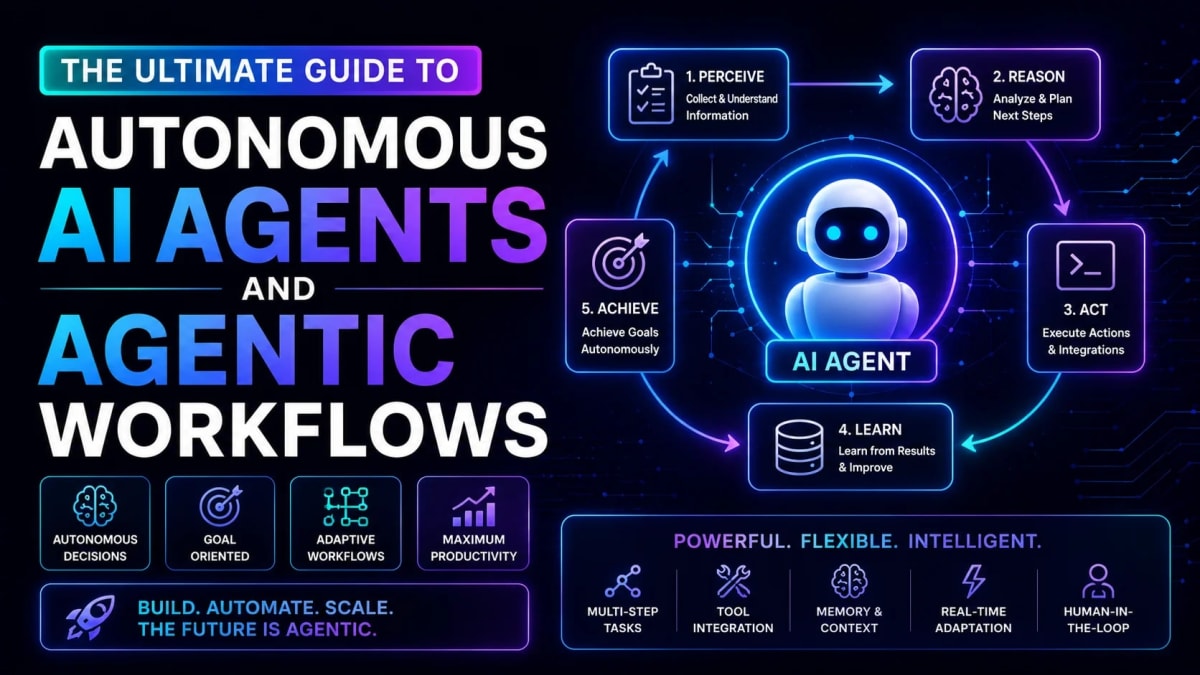
That's the real shift happening right now. We've moved past the era of "write me an email" prompts. Autonomous AI agents can now perceive a goal, plan the steps to reach it, execute tools like browsers and APIs, check their own work, and loop back if something goes wrong all without hand-holding.
This guide breaks down exactly how they work, which frameworks are worth your time in 2026, and how to build one without blowing up your API bill.
The perception-reasoning-action loop that makes agents actually autonomous
LangGraph vs CrewAI vs AutoGen honest comparison for real projects
How to build an agent safely without runaway API costs
Real business use cases generating measurable ROI right now
The exact security guardrails every production agent needs
What Is an Autonomous AI Agent - Really?
Here's the simplest definition I've found: an autonomous AI agent is an LLM that has been given tools, memory, and a loop. That's it.
A regular ChatGPT prompt is stateless and linear input in, output out, done. An agent is different in three important ways:
It can call tools: web search, database queries, REST APIs, code execution anything you wire up becomes available.
It has memory: short-term context within a session, plus optionally a vector database for long-term recall across sessions.
It loops: after each action, the agent evaluates the result and decides whether the goal is complete or if more steps are needed.
That loop — perceive → reason → act → evaluate → repeat is what makes the difference between a chatbot and something that genuinely gets work done. Sound familiar? It's basically the same structure your own brain uses when you're debugging a production outage at 2am.
Agentic AI vs Standard LLMs - The Real Difference
I see this confused all the time, so let's settle it clearly.
When you use GPT-4 or Claude directly, you are the agent. You read the output, decide what to do next, copy something into another tool, feed results back, and repeat. You're doing the looping manual. This is fine for one-off tasks, but it doesn't scale.
Agentic AI workflows take that manual loop and automate it. The model itself handles the "read output → decide → act → repeat" cycle. The human sets the goal and reviews the final result. Everything in between is handled by the agent.
In practice, a well-built agent for a customer support workflow might independently: read an incoming ticket, query the billing database for that user's history, check if a similar issue was resolved before in a knowledge base, draft a response, apply the refund via an API, and close the ticket all before a human ever sees it. That's not science fiction anymore; teams are doing this in production today.
The question isn't whether agentic AI is useful. It's whether you're building it safely and with the right tools. Let's talk about those frameworks.
Top AI Agent Frameworks in 2026 - Honest Comparison
The framework ecosystem has matured significantly. Here are the three I'd actually recommend for production use, and why you'd choose each one.
LangGraph - For Complex, Stateful Pipelines
Built by the LangChain team, LangGraph treats your agent workflow as a directed graph each node is a step, edges are the transitions between steps, and the graph can loop, branch, and backtrack. This makes it excellent for workflows that aren't strictly linear.
When would I use LangGraph? Any time your workflow has conditional logic "if the search returns no results, try a different query strategy" or "if the generated code fails, debug and retry up to 3 times." The graph structure handles these branches cleanly without spaghetti code. It also has first-class support for multi-agent systems where one supervisor agent delegates to specialized sub-agents.
The learning curve is steeper than the alternatives, but the control you gain is worth it for anything that'll run in production.
CrewAI - For Role-Based Multi-Agent Teams
CrewAI models your agents like a corporate team. You define agents with specific roles ("Senior Researcher", "Content Writer", "Fact Checker"), give each a goal and backstory, and let them collaborate on a shared task. The mental model clicks almost immediately you're hiring a team, not writing a state machine.
I've seen non-technical founders spin up working CrewAI workflows in a weekend. For content pipelines, research automation, and business process flows, it's genuinely the fastest path from idea to working prototype. The tradeoff is less fine-grained control over execution flow compared to LangGraph.
Microsoft AutoGen - For Conversational Multi-Agent Debate
AutoGen's superpower is letting agents argue with each other. You set up two or more agents that can challenge each other's outputs, request clarifications, and iterate toward a consensus answer. For complex reasoning tasks code review, architectural decisions, research synthesis this multi-agent debate often produces significantly better results than a single agent running alone.
It's more verbose to configure than CrewAI, but for engineering tasks that require correctness, the extra reliability is worth it.
Not sure which framework to start with? If you're new to agents, start with CrewAI you'll have something working in a day. If you're building for production scale with complex logic, invest the time in LangGraph. That said, understanding how to structure your agent's communication layer properly matters across all three read our guide on MCP (Model Context Protocol) to understand how modern agents pass data between components securely.
How to Build AI Agents Safely - A Production Blueprint
Honestly, the first agent I built ran fine in testing and then burned through $47 of API credits in 90 minutes when I let it loose on a real task. That was an expensive lesson in why guardrails aren't optional.
Here's the safety-first blueprint I now use for every agent I ship:
1. Define Strict Tool Boundaries
Every tool you give an agent should follow the principle of least privilege. If an agent needs to read from a database, give it a read-only connection. If it needs to post to Slack, give it a scoped API token for one specific channel. Never hand an agent broad credentials and hope it behaves responsibly.
2. Set Hard Loop Limits
Every agent loop should have a maximum iteration count. Set it in code, not in the prompt. I typically start at 10-15 iterations for research tasks and 5-7 for action-heavy workflows. If an agent hits the limit without completing, log the state and surface it for human review. This alone will save you from runaway billing spikes.
3. Validate Every Output Schema
When an agent produces structured data that feeds into the next step, validate it against a strict schema before passing it along. A rogue JSON payload with unexpected keys can corrupt downstream database writes in ways that are painful to debug. For TypeScript projects, our JSON to TypeScript Converter is a fast way to generate the interfaces you need for these validations.
4. Implement a Human-in-the-Loop Checkpoint for High-Stakes Actions
Not every action should be automated. Sending emails, processing payments, deleting records these should pause and request human confirmation before execution. Build this checkpoint into the graph as a specific node. Most frameworks support a "human approval" step natively.
5. Log Everything
Every agent decision, tool call, and response should be logged with a unique run ID, timestamps, token counts, and the input/output for each step. You'll need this for debugging (agents fail in weird ways), for cost attribution, and for compliance if you're handling sensitive data.
For agents that handle authentication tokens between services which is common in multi-system workflows understanding how token verification works is critical security knowledge. Our JWT Decoder and Verifier lets you inspect tokens directly in the browser to confirm what your agents are actually passing around.
Real Business Use Cases Generating ROI in 2026
Let's get specific, because "automate your workflows" is too vague to act on.
Customer Support Triage: Agents read incoming tickets, classify urgency, pull relevant account data from CRMs, draft responses for routine questions, and escalate complex issues with full context already attached. Response times drop from hours to minutes.
Competitive Intelligence: An agent monitors competitor product pages, pricing, job postings (to infer product roadmap priorities), and press releases then weekly delivers a synthesized brief. What used to take a junior analyst a full day now runs overnight automatically.
Code Review and Documentation: Agents can review pull requests against a company's coding standards, flag security issues, and generate documentation drafts for new functions. Junior developers get immediate feedback; senior developers spend less time on routine reviews.
Data Pipeline Healing: Agents monitor ETL pipelines, detect schema drift or failed jobs, attempt automatic fixes for known error patterns, and page a human only when the issue requires judgment. Mean time to recovery drops dramatically.
Content Operations: Research agents gather information, writer agents draft sections, editor agents fact-check and refine tone, and a final agent handles SEO optimization and internal linking before a human does the final polish.
The pattern across all of these is the same: a human sets the goal and reviews the output, and the agent handles all the mechanical, repetitive steps in between. That's the sweet spot for agentic automation in 2026.
Common Mistakes That Kill Agent Projects
I've seen (and made) enough of these mistakes to fill a blog post on its own. These are the ones that derail projects most often:
Prompting the loop instead of coding it: "Don't exceed 10 steps" in a system prompt is not a guardrail it's a suggestion. Agents hallucinate adherence to their own instructions. Hard-code your limits in the control layer.
Giving agents too many tools at once: An agent with 20 available tools will often freeze in analysis paralysis or choose the wrong one. Start with 3-4 tightly scoped tools and add more only when there's a clear gap.
Skipping structured output validation: If an agent can return freeform text where you expect JSON, it eventually will usually at the worst possible moment. Force structured outputs at the model level using JSON mode or tool-calling schemas.
Building the agent before the tool: The best agentic workflows are built on top of reliable, well-tested individual tools. An agent that calls a flaky API will fail unpredictably. Make your tools robust first, then wrap them in agentic logic.
Ignoring context window limits on long runs: In multi-step workflows, conversation history grows fast. Most developers don't notice until an agent fails mysteriously at step 15 because it's exceeded the context limit. Implement explicit memory management summarize or prune older turns after each checkpoint.
What's Next: The Autonomous Transition in Software Development
The honest truth is that we're very early in this shift. The developers who will benefit most aren't the ones waiting for the perfect framework or the perfect model they're the ones building and learning right now, making the mistakes that teach them how agents actually behave in production.
The trajectory is clear: software development is moving from writing every line manually to expressing intent and supervising autonomous systems that do the implementation work. Developers who understand agentic workflows will architect the systems that everyone else uses. Those who don't will increasingly find themselves on the outside of how software actually gets built.
If you're building AI-powered tools and want to accelerate your prompt engineering for agent system prompts, our AI Prompt Generator can help you craft and optimize the instructions that drive agent behavior directly in your browser, no account needed.
Start with one workflow. One agent. One clearly defined goal. Ship it. Learn from how it fails. Then build the next one. That's the entire playbook.
Frequently Asked Questions
What is an autonomous AI agent?
An autonomous AI agent is an AI system that can independently plan, execute, and evaluate multi-step tasks without constant human input. Given a high-level goal, it breaks the goal into subtasks, selects appropriate tools (like web search or APIs), executes those tools, reviews the results, and repeats the cycle until the goal is complete. The key difference from a regular chatbot is the autonomous loop the agent decides its own next action based on intermediate results.
How is agentic AI different from standard ChatGPT?
Standard ChatGPT and similar models work in a single round-trip: you send a prompt, it sends back a response, the conversation ends there until you send another message. Agentic AI workflows run in a loop autonomously after each action, the agent evaluates whether it's done, decides what to do next, and continues without waiting for human input. It can also call external tools like databases, APIs, and browsers which a plain chatbot cannot.
What are the best AI agent frameworks to use in 2026?
The three production-ready frameworks worth your time are LangGraph (best for complex stateful workflows with conditional branching), CrewAI (best for role-based multi-agent collaboration with a fast learning curve), and Microsoft AutoGen (best for multi-agent reasoning tasks where agents challenge each other's outputs). For most developers starting out, CrewAI offers the fastest path from idea to working prototype.
How do I prevent runaway API costs when running agents?
The most important safeguard is a hard-coded maximum iteration limit set this in your control logic, not in the agent's system prompt. Also implement per-run token budgets, log every API call with its cost, and build a kill switch that can halt a running agent from outside the loop. Start with conservative limits (10 iterations, $1 budget) and raise them only after observing real behavior in production.
Are autonomous AI agents safe for handling business data?
They can be, but only with proper guardrails built from the start. This means applying the principle of least privilege to every tool and API credential an agent can access, validating all structured outputs against strict schemas, implementing human-approval checkpoints for irreversible actions (sending emails, processing payments, deleting data), and maintaining comprehensive audit logs. Agents that are handed broad credentials and trusted to "behave" will eventually cause data incidents.
Do I need to know machine learning to build AI agents?
No. Modern agent frameworks like LangGraph, CrewAI, and AutoGen abstract away everything at the model level. You're calling APIs, writing orchestration logic, and configuring tool schemas standard software engineering skills. A developer comfortable with JavaScript/TypeScript or Python can build production-grade agents without any ML background. The hard parts are system design, security, and getting the prompt engineering right not the math.
Are the tools on WebToolsHub free to use?
Yes. every tool on WebToolsHub is completely free, requires no account or sign-up, and runs entirely in your browser. No data is sent to any server, which makes them safe to use with real API tokens, JSON payloads, and other sensitive development data.
Tagged in
Continue Reading
All Articles
Level Up Your Workflow
Free tools mentioned in this article
Stripe & PayPal Fee Calculator
Calculate the exact Stripe and PayPal transaction fees for US and UK markets. A free developer tool to estimate SaaS payouts, merchant costs, and revenues.
AI Prompt Generator
Use our free AI prompt generator to improve AI prompts. The ultimate ChatGPT prompt optimizer and Midjourney prompt maker. Top free AI prompt builder tool.
Fancy Font & Stylish Text Generator
Transform your text into 50+ stylish and aesthetic fonts instantly. Perfect for Instagram bios, TikTok captions, and PUBG nicknames. One-click copy & paste.
WebMCP Tool Schema Generator
Generate declarative HTML form structures or imperative JavaScript/TypeScript schemas to register local web tools with AI browser agents.