
Model Context Protocol (MCP) Explained: Complete Developer Guide 2026
Author
Muhammad Awais
Published
May 20, 2026
Reading Time
11 min read
Views
16.1k
If you have been paying attention to the AI developer ecosystem in 2026, you have probably seen the acronym MCP showing up everywhere in GitHub READMEs, in AI tool documentation, in job descriptions. Model Context Protocol, or MCP, is quietly becoming the standard plumbing layer for how AI models connect to the real world. Understanding it is no longer optional for developers building anything that involves AI. This guide explains what MCP actually is, why it matters, how it works, and how to start using it in your own projects today.
What Is Model Context Protocol?
Model Context Protocol is an open standard introduced by Anthropic in late 2024 that defines how AI models communicate with external tools, data sources, and services. Think of it as a universal adapter the same way USB-C standardized how devices connect to peripherals, MCP standardizes how an AI model connects to everything outside of itself.
Before MCP, every AI integration was bespoke. If you wanted Claude to read from your database, you built a custom function. If you wanted it to push to GitHub, you wrote another custom integration. If you wanted it to check your calendar, you built yet another connector. Each of these was hand-rolled, maintained separately, and not reusable across different AI models or clients. The duplication of effort across the entire developer ecosystem was enormous.
MCP solves this by defining a common protocol that any AI client can speak and any tool server can implement. You build an MCP server once for your database, and any MCP-compatible AI client Claude, Cursor, Antigravity IDE, your own custom application can connect to it immediately without additional integration work. Write once, connect everywhere.
How MCP Works: The Architecture in Plain English
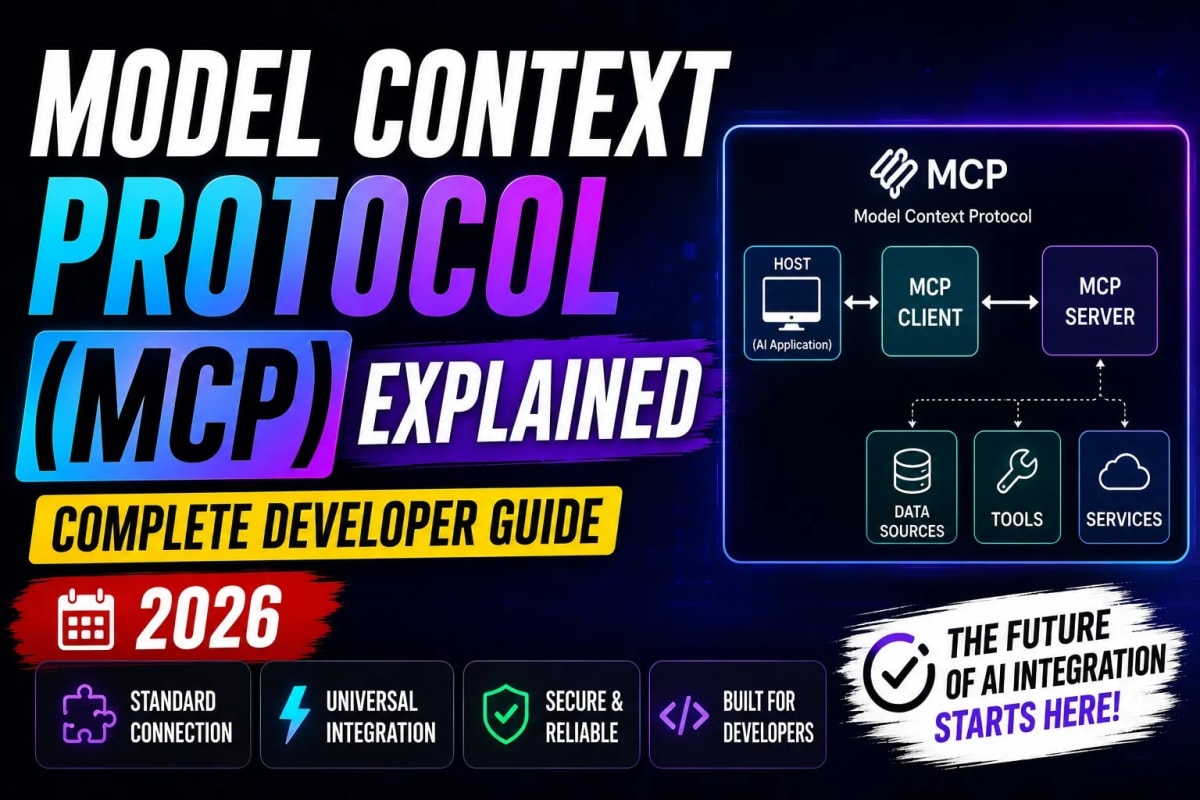
The MCP architecture has three components: a host, a client, and a server. The host is the AI application — Claude Desktop, your Cursor IDE, or an app you build yourself. The client is a component inside the host that manages MCP connections. The server is a lightweight process that exposes your tools, data, or capabilities through the MCP protocol.
When you ask an AI inside an MCP-enabled host to do something say, "check if there are any open pull requests on my repo" here is what happens step by step. The AI recognizes it needs an external capability. It calls the MCP client. The client sends a standardized request to the relevant MCP server (in this case, a GitHub MCP server). The server executes the actual API call to GitHub, gets the data, and returns it through the protocol back to the client. The client hands that context back to the AI. The AI incorporates it into its response.
From your perspective as the user, it feels seamless the AI just knows about your pull requests. But under the hood, a clean separation of concerns is happening. The AI does not need to know how GitHub's API works. The MCP server handles that. The AI only needs to know how to ask for what it needs through a standardized protocol.
MCP vs Traditional APIs: What Is Actually Different
This is where developers often get confused, so let's be precise. MCP is not a replacement for APIs. Your GitHub API still exists. Your database still has its own query interface. MCP is a layer that sits between an AI model and those existing interfaces. The MCP server is what speaks both languages it knows the MCP protocol on one side and your existing API on the other.
The key differences that matter in practice: traditional API integrations are point-to-point and model-specific. You build an integration for one model and it works for that model only. MCP integrations are model-agnostic. An MCP server you build for Claude works equally well when plugged into any other MCP-compatible host. Additionally, MCP is designed for dynamic context the server can expose discoverable tools that the AI learns about at runtime, rather than needing the developer to hardcode what capabilities are available at build time.
There is also a resource model built into MCP that pure API calls don't have. MCP servers can expose three types of primitives: tools (things the AI can call to take actions), resources (data the AI can read, like files or database records), and prompts (reusable prompt templates the server can provide to the host). This richer contract means the AI has a cleaner, more structured way of understanding what a given server can do.
Who Is Already Using MCP in 2026
MCP adoption has been striking since the open-source release. Within the first year, over 1,000 community-built MCP servers appeared on GitHub. Major platforms including Google Drive, Slack, GitHub, Notion, Postgres, Stripe, and Linear have published official MCP servers. Every major AI IDE Cursor, Windsurf, Antigravity, and VS Code through extensions now supports MCP connections natively. Anthropic's Claude Desktop application shipped MCP support shortly after the protocol's release.
The adoption pattern mirrors what happened with REST APIs in the 2010s. At first it seemed like a nice-to-have standard. Then enough tools adopted it that it became the path of least resistance. By 2026 it is close to that tipping point for AI tooling. If you are building an internal tool, a developer product, or any application that wants AI capabilities, understanding MCP is genuinely becoming a foundational skill alongside knowing how to write a REST endpoint.
MCP is also the infrastructure layer that makes autonomous AI agents practical. When an agent needs to take multi-step actions across multiple systems read from a database, send a Slack message, update a Notion doc, open a GitHub issue it is MCP that makes those connections standardized and reliable. If you want to understand how agents use these connections in agentic workflows, our deep-dive on autonomous AI agents and agentic workflows covers exactly how this layer gets used in production.
Building Your First MCP Server: A Practical Walkthrough
Let's make this concrete. Here is how you build a minimal MCP server in TypeScript that exposes a tool to fetch the latest posts from a MongoDB database exactly the kind of thing a developer working on a Next.js blog platform would need.
First, install the official MCP TypeScript SDK:
npm install @modelcontextprotocol/sdkThen create your server file:
import { McpServer } from "@modelcontextprotocol/sdk/server/mcp.js";
import { StdioServerTransport } from "@modelcontextprotocol/sdk/server/stdio.js";
import { z } from "zod";

const server = new McpServer({
  name: "blog-server",
  version: "1.0.0",
});

// Define a tool the AI can call
server.tool(
  "get-latest-posts",
  "Fetch the latest blog posts from the database",
  { limit: z.number().default(5) },
  async ({ limit }) => {
    // Your actual database call goes here
    const posts = await fetchPostsFromDB(limit);
    return {
      content: [{ type: "text", text: JSON.stringify(posts) }],
    };
  }
);

const transport = new StdioServerTransport();
await server.connect(transport);
That is the complete skeleton of an MCP server. The server.tool() call registers a named tool with a description (which the AI reads to understand what the tool does), an input schema using Zod, and an async handler. When an MCP-compatible AI client connects to this server, it discovers the get-latest-posts tool automatically and knows how to call it when relevant.
Connecting Your MCP Server to Claude Desktop
Once your server is built, connecting it to Claude Desktop takes about two minutes. Open your Claude Desktop configuration file. On Mac it lives at ~/Library/Application Support/Claude/claude_desktop_config.json. On Windows it is at %APPDATA%Claudeclaude_desktop_config.json. Add your server to the mcpServers object:
{
  "mcpServers": {
    "blog-server": {
      "command": "node",
      "args": ["/absolute/path/to/your/server.js"]
    }
  }
}
Restart Claude Desktop. You will see a small hammer icon appear in the chat interface indicating active MCP tool connections. Claude can now call your get-latest-posts tool whenever it determines it's relevant to your query. The same config pattern works for Cursor and Antigravity IDE, just in their respective config locations.
⚡ Write Better AI Prompts With Our Free Optimizer Tool
Security: The Part Everyone Skips
MCP servers are processes that run with real system permissions. A poorly configured MCP server is not just a bad integration it is a security surface. Before you connect any MCP server to an AI client, especially one running in a shared or production environment, think through a few things carefully.
First, apply the principle of least privilege. Your MCP server should have exactly the permissions it needs and nothing more. If a server only needs to read from a database, give its credentials read-only access. If it only needs to post to one Slack channel, scope the Slack token to that channel. The AI will have access to everything the server can do, so minimizing the server's capabilities directly minimizes risk.
Second, validate all inputs in your tool handlers even though MCP clients send typed inputs. The input schema catches type errors but not logical abuse. If your tool accepts a file path, validate it is within an expected directory. If it accepts a database query, use parameterized queries, not string interpolation. Treat MCP tool inputs with the same caution you would treat HTTP request bodies in an API endpoint.
Third, be cautious with community MCP servers from unknown sources. The open-source MCP ecosystem grew quickly, and not every server on GitHub has been audited. A malicious MCP server could exfiltrate data or execute commands with whatever permissions your user session has. Stick to official servers from recognized vendors, or servers with transparent codebases you have reviewed yourself.
MCP and the Bigger Picture for Developers in 2026
MCP is part of a broader shift in what it means to build software in 2026. The combination of vibe coding workflows, agentic AI systems, and standardized protocols like MCP means that the ceiling on what a small team or a single developer can build has risen dramatically. A solo developer today can realistically connect an AI to their database, their GitHub, their communication tools, and their deployment pipeline, and have that AI take meaningful autonomous actions across all of them, using MCP as the connective tissue.
This does not make backend engineering irrelevant. It makes the developers who understand both how to build robust systems and how to wire AI into those systems through protocols like MCP more valuable than they have ever been. The MCP server is still code. It still needs to be well-designed, secure, and maintainable. The AI does not change that it just changes who can productively use the end result.
If you want to pair this MCP knowledge with a faster overall development workflow, it meshes naturally with both the vibe coding approach covered in our complete vibe coding guide for 2026 and the broader tooling decisions you can explore in our breakdown of the top React and Next.js developer tools for 2026.
Frequently Asked Questions
What is Model Context Protocol (MCP) in simple terms?
MCP is an open standard that defines how AI models connect to external tools, data sources, and services. Instead of building a custom integration every time you want an AI to access a new tool, you build one MCP server that any MCP-compatible AI can use. Think of it as USB-C for AI tool connections a universal standard that eliminates the need for proprietary adapters.
Is MCP only for Claude, or does it work with other AI models?
MCP works with any AI client that implements the protocol. While Anthropic created MCP and Claude was the first model to use it, the protocol is fully open source and model-agnostic. Cursor, Windsurf, Antigravity IDE, VS Code through extensions, and many other clients now support MCP. An MCP server you build once can be connected to any of these clients without modification.
What is the difference between MCP tools, resources, and prompts?
MCP servers can expose three types of primitives. Tools are callable functions that let the AI take actions — like posting a message or querying a database. Resources are data the AI can read, like file contents or database records, without triggering a side effect. Prompts are reusable prompt templates the server can provide to the host application. Most MCP servers you will encounter primarily expose tools, but resources are useful for read-heavy integrations and prompts help with standardizing interactions.
Do I need to know a specific language to build an MCP server?
Official MCP SDKs exist for TypeScript and Python, which covers the majority of web developers. Community SDKs have also appeared for Go, Rust, Java, and other languages. If you are a JavaScript or TypeScript developer, the official SDK is well-documented and the setup is straightforward. A basic MCP server can be written in under 50 lines of TypeScript, as shown in the walkthrough above.
Are there pre-built MCP servers I can use without building my own?
Yes, and this is one of the most practical aspects of MCP's open ecosystem. Official MCP servers are available for Google Drive, GitHub, Slack, Notion, PostgreSQL, Stripe, Linear, and dozens of other platforms. Anthropic maintains a reference list, and the broader community has published over a thousand servers on GitHub. For most common tools and services, you can connect an existing MCP server rather than building from scratch, which takes the setup time from hours to minutes.
Tagged in
Continue Reading
All Articles
Level Up Your Workflow
Free tools mentioned in this article
Pomodoro Focus Timer
Boost your productivity using the best aesthetic Pomodoro timer online app. A free, unblocked 50/10 focus timer for Mac and Windows with music integration.
Bcrypt Generator & Verifier
Generate and verify Bcrypt password hashes instantly in your browser. A secure, client-side Bcrypt hash calculator for developers with zero backend logs.
Image to WebP Converter
Convert up to 25 JPG, PNG, TIFF and BMP images to WebP with live before/after preview, smart resizing, and real-time savings metrics 100% client-side, nothing uploaded.
Fancy Font & Stylish Text Generator
Transform your text into 50+ stylish and aesthetic fonts instantly. Perfect for Instagram bios, TikTok captions, and PUBG nicknames. One-click copy & paste.