
CSS Variables & Design Tokens The Right Way to Build a Design System in 2026
Author
Muhammad Awais
Published
May 20, 2026
Reading Time
13 min read
Views
18.2k
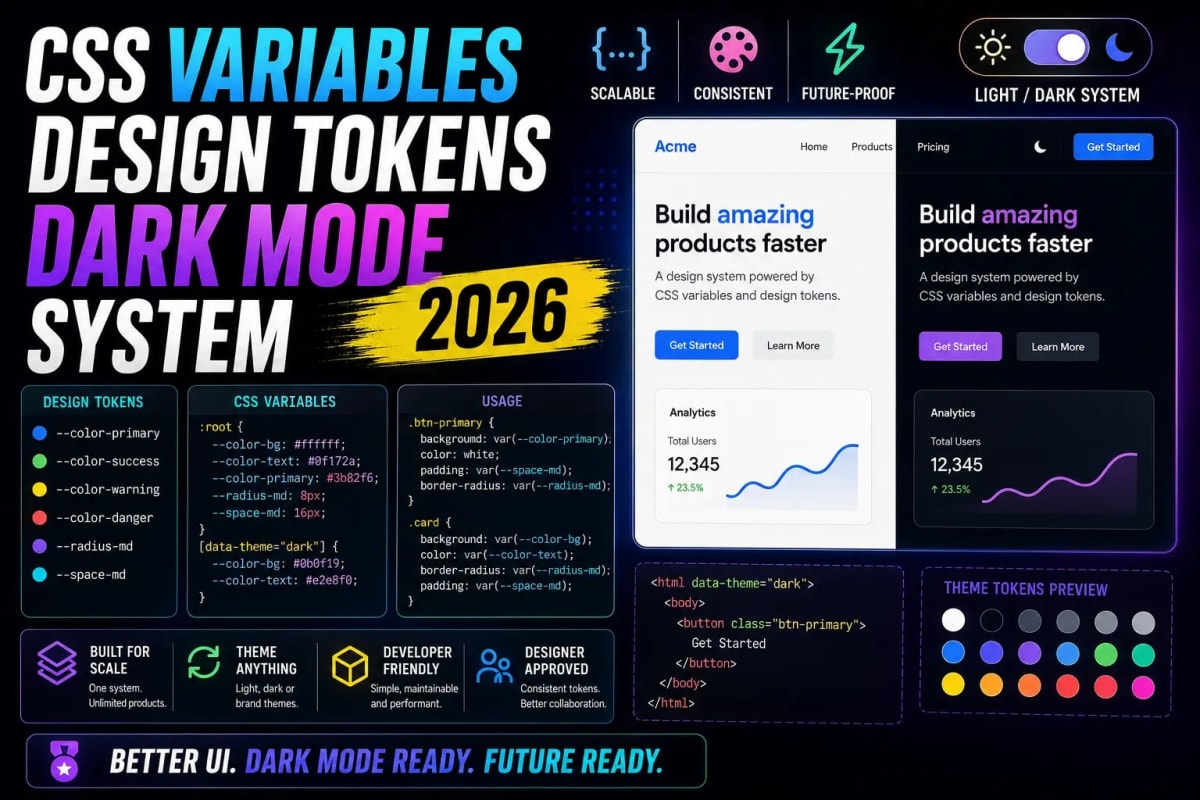
CSS custom properties what most developers call CSS variables have been supported in every major browser since 2017. Yet in 2026, the majority of production codebases still use them wrong: scattering raw color values everywhere, inventing ad-hoc naming schemes, and wondering why dark mode ships broken every second release. This guide covers how CSS variables actually work at scale, how design tokens slot in above them, and the exact architecture that makes theming, dark mode, and component styling maintainable long-term.
Why CSS Variables Are Still Misunderstood in 2026
The surface API is deceptively simple: declare a variable with two dashes, reference it with var(), done. That simplicity hides the three things that actually make CSS variables powerful and the three things that cause teams to outgrow their implementation in six months.
First: CSS variables are inherited. A variable declared on :root is available in every element on the page but a variable declared on a .card selector only exists inside that component's subtree. This means you can override a global token locally without touching global styles. That is a feature, not a workaround.
Second: CSS variables are resolved at runtime, not at build time. Sass variables and Tailwind's JIT compilation both happen before the browser sees a single byte. CSS custom properties change value in response to media queries, JavaScript, user interaction, and DOM mutations which is why they are the only real solution for instant dark mode without a flash of unstyled content. If you have shipped dark mode with a body class toggle and seen the flicker, the problem is almost always that something in your stack is bypassing the CSS variable layer. The full picture of why that happens and how to fix it permanently is covered in our guide on eliminating dark mode flicker and FOUC in Next.js with CSS variables.
Third: CSS variables accept any value not just colors. Numbers, strings, calc expressions, even partial values like a shadow offset without a unit. This makes them useful for responsive spacing systems, animation timing, and component-level configuration in ways that Sass variables never could be.
What Design Tokens Actually Are (and What They Are Not)
Design tokens are a naming convention and a source-of-truth format that sits above CSS variables. A token is a named decision color.background.surface, spacing.component.gap-sm, typography.body.size stored in a JSON or YAML file that design tools and code can both read. The CSS variable is the runtime output. The token is the contract.
This distinction matters because CSS variables have no constraints on naming or structure. Without a token layer, every developer invents their own scheme. The result is a codebase where --blue-500, --primary, --brand-color, and --color-interactive-default all refer to the same hex value in different files. Nobody knows which one to use. Dark mode overrides get applied to half of them. The design is inconsistent and the code is unmaintainable.
The W3C Design Tokens Community Group has been working on a specification to standardize the token format since 2021, and as of 2026 the format is stable enough that major tools Figma Variables, Style Dictionary, Theo, and Token Transformer all support it. You do not need to wait for perfect tooling to adopt the concept. Even a simple JSON file with a consistent naming convention is enough to solve 90 percent of the maintenance problems that raw CSS variables create.
The naming convention that works at scale separates tokens into three tiers: primitive tokens (the raw values blue-500: #3b82f6), semantic tokens (the decisions color-interactive-default: blue-500), and component tokens (the local overrides button-bg: color-interactive-default). Components reference only their own tokens. Component tokens reference semantic tokens. Semantic tokens reference primitives. This chain is the entire system.
The Three-Tier Architecture in CSS
Implementing the three tiers in pure CSS looks like this. On :root you declare every primitive:
:root {
  /* Primitives */
  --blue-500: #3b82f6;
  --blue-600: #2563eb;
  --zinc-50:  #fafafa;
  --zinc-900: #18181b;
  --space-4:  1rem;
  --space-2:  0.5rem;
  --radius-md: 0.375rem;
}
Then, also on :root, you map semantic tokens once for light mode, overridden for dark:
:root {
  /* Semantic — light */
  --color-bg-surface:       var(--zinc-50);
  --color-text-primary:     var(--zinc-900);
  --color-interactive:      var(--blue-500);
  --color-interactive-hover: var(--blue-600);
}

@media (prefers-color-scheme: dark) {
  :root {
    --color-bg-surface:   var(--zinc-900);
    --color-text-primary: var(--zinc-50);
  }
}
Components consume only semantic tokens, never primitives directly:
.btn-primary {
  background-color: var(--color-interactive);
  color:            var(--color-bg-surface);
  padding:          var(--space-2) var(--space-4);
  border-radius:    var(--radius-md);
}

.btn-primary:hover {
  background-color: var(--color-interactive-hover);
}
The result: switching themes requires changing only the semantic layer. Components never need to be touched. Adding a third theme high contrast, brand override, per-tenant customization is just another block of semantic overrides on a different selector. The components are already theme-ready by construction.
CSS Variables With Tailwind The Hybrid Approach That Actually Works
Most Next.js projects use Tailwind, and the common question is whether design tokens and Tailwind are in conflict. They are not they are complementary. Tailwind is a utility class generator. CSS variables are runtime values. The right integration is to feed your semantic tokens into Tailwind's config so utility classes reference the variables instead of hard-coded values.
In tailwind.config.ts you extend the theme like this:
theme: {
  extend: {
    colors: {
      surface:     "var(--color-bg-surface)",
      "text-primary": "var(--color-text-primary)",
      interactive: "var(--color-interactive)",
    },
  },
}
Now bg-surface and text-text-primary are available as utility classes that resolve to your semantic tokens at runtime. Dark mode works automatically via the CSS variable override you do not need Tailwind's dark: prefix on every element. This eliminates the most common source of missed dark mode coverage: forgetting a dark: variant on a new component.
The caveat with this approach: Tailwind cannot compute opacity variants for CSS variable colors without the RGB channel trick. If you need bg-interactive/50, your variable needs to store the raw RGB channels --color-interactive-rgb: 59 130 246 and the Tailwind config references rgb(var(--color-interactive-rgb) / <alpha-value>). It is slightly verbose to set up, but it is a one-time cost per token.
TypeScript and Design Tokens Keeping the System Type-Safe
One of the underused benefits of a token-based system is that the tokens become a typed contract in TypeScript. If you store your tokens in a JSON file, you can import it with as const and derive a union type from its keys. Then any component that accepts a semantic token name as a prop gets full autocomplete and compile-time validation.
import tokens from "@/design-tokens/semantic.json" assert { type: "json" };

type SemanticToken = keyof typeof tokens;

function applyToken(token: SemanticToken) {
  return `var(--${token})`;
}

// TS error if you pass a token that does not exist:
applyToken("color-bg-surface");     // ✅
applyToken("color-made-up-token");  // ❌ compile error
This pattern closes the gap between design and code. A token that is renamed in the JSON file will immediately surface TypeScript errors at every usage point across the entire codebase. Compared to finding a renamed CSS variable by doing a text search and hoping you caught every occurrence, this is an enormous quality-of-life improvement. Many of the same discipline principles that apply to type safety in general being explicit, avoiding implicit any, and making impossible states unrepresentable apply directly to design token management. The overlap between type hygiene and token hygiene is real, and the cost of skipping either is paid in the same way: subtle bugs at runtime that the compiler could have caught. Our breakdown of the TypeScript mistakes silently breaking Next.js apps covers the broader class of type errors that sneak through without this discipline.
There is a secondary benefit: the JSON token file becomes the single source of truth that a CSS-generating script reads at build time to produce your :root declarations. The JSON file is what your designer exports from Figma Variables. The script converts it to CSS. TypeScript reads it for type safety. All three consumers design tool, CSS output, TypeScript stay in sync automatically because they all read the same file.
Performance Implications of CSS Variables at Scale
CSS variables are computed by the browser's style engine, which means there is a real (if small) cost to resolving them. For typical token usage dozens to a few hundred variables this cost is completely negligible. The performance risk with CSS variables comes from a specific pattern: declaring hundreds of component-scoped variables on deeply nested selectors where the browser needs to re-resolve them on every style recalculation.
The practical rule is: declare as high in the tree as possible, and do not use component-scoped variable overrides for values that could simply be semantic tokens. Scoped overrides are appropriate for genuine per-instance customization a card component with a configurable accent color. They are not appropriate as a workaround for an under-specified semantic token layer.
A related concern: dynamic JavaScript writes to CSS variables element.style.setProperty("--color-accent", value) trigger style recalculations on the affected subtree. For animations, this is usually fine because you are already in a requestAnimationFrame loop. For one-time theme switches, the cost is paid once and forgotten. For values that update on every scroll event or mouse move, you need to be deliberate about which subtree you are dirtying.
The interaction between CSS variable resolution and Core Web Vitals is mostly indirect: a well-structured token system reduces visual inconsistency, and visual inconsistency in dark mode often shows up as layout shifts when images or backgrounds load with the wrong color before the theme kicks in. Eliminating those flickers directly improves CLS scores. The full techniques for Next.js-specific CLS and INP optimization go beyond theming alone and are covered thoroughly in our guide to advanced Core Web Vitals and mobile optimization in Next.js.
Tooling That Makes This Maintainable Without Becoming a Full-Time Job
Maintaining a design token system sounds expensive until you set up the right tooling. The three tools that provide the most leverage per setup hour are Style Dictionary, the Figma Variables REST API, and a lint rule that enforces no raw color values in CSS.
Style Dictionary takes your token JSON and outputs CSS, JavaScript, iOS, and Android formats from a single source. The configuration is minimal point it at your tokens file, tell it what formats to output, run it as a prebuild step. From that point forward, changing a token value in JSON is the only step required to update every output simultaneously.
stylelint-plugin-no-raw-colors (or a custom rule that flags any hex value outside of the primitives file) is the enforcement mechanism. Without a lint rule, the token system erodes within weeks. Developers under pressure will hardcode a hex value directly into a component and move on. The lint rule makes that a build error, which is the only reliable way to keep a system consistent across a team.
The Figma Variables REST API, available since Figma's 2024 developer platform update, lets you export your design team's Figma Variables directly as JSON. The loop becomes: designer updates a token in Figma → CI pulls the updated JSON via API → Style Dictionary regenerates the CSS → PR is opened for review. Design changes move from Figma to production without any manual copy-paste. This is the workflow that eliminates the entire category of "the design says X but the code says Y" bugs.
Setting this pipeline up takes a few hours. After that it runs on its own. The discipline of automating every repeatable step including design-to-code token sync is the same discipline that applies to the rest of a high-output development workflow. If you want the broader tooling philosophy behind building fast and maintaining quality simultaneously, our breakdown of the lazy developer's workflow for Next.js that makes you 10x faster lays out the full automation stack worth setting up once.
When Not to Use Design Tokens
Design tokens are not the right tool for everything. One-off animations with unique values, temporary layout experiments, prototype code that will be thrown away none of these need to be tokenized. Forcing every value into a token system adds friction without adding value when the value will never be reused or themed.
The test is simple: will this value ever need to change across themes, or be reused in more than one component? If yes, it is a token. If no, it is an inline value. Applying this test consistently keeps the token system lean. A bloated token system with hundreds of single-use tokens is as hard to maintain as no system at all, because developers cannot find the token they need and resort to creating duplicates or hardcoding values.
The goal is a system where every color, spacing value, radius, and shadow that appears in more than one place or that needs to respond to a theme is a token. Everything else is local. That boundary, held consistently, is what separates a design system from a style guide.
Frequently Asked Questions
Do CSS variables work in all browsers in 2026?
Yes. CSS custom properties have had full cross-browser support since 2017 Chrome, Firefox, Safari, and Edge all support them without any prefix or polyfill. The only edge case is very old Android WebView versions that you likely do not need to support. For any project targeting modern browsers, CSS variables are safe to use without reservation.
What is the difference between a design token and a CSS variable?
A design token is a named value stored in a format-agnostic file (usually JSON) that represents a design decision. A CSS variable is one possible runtime output of that token. The same token can also output as a JavaScript constant, an iOS color, or an Android resource. The token is the source of truth. The CSS variable is the CSS representation of that truth. Using CSS variables without a token layer just gives you unstructured global variables with no enforced naming convention.
Should I use CSS variables or Tailwind's dark: prefix for dark mode?
CSS variables win for dark mode at scale. Tailwind's dark: prefix requires you to write every dark variant explicitly on every element, which means every new component requires double the color utilities. CSS variables flip the theme with a single selector override all components respond automatically. The hybrid approach (CSS variable tokens mapped into Tailwind's config) gives you the utility-first workflow with automatic dark mode coverage.
Can I use CSS variables with CSS-in-JS libraries like styled-components?
Yes, and they work well together. CSS variables are read by the browser at render time regardless of how the CSS was generated. A styled-component can reference var(--color-interactive) just like a plain CSS rule can. The token overrides on :root apply globally. The main benefit of combining them is that you get dynamic theming without re-injecting new CSS-in-JS styles the variable values change, the component re-renders with the new resolved values, and no style tag churn is involved.
How many design tokens is too many?
There is no hard number, but a useful heuristic: if a developer has to search for the right token instead of being able to predict its name, your system has too many tokens or poor naming. A well-structured system covering colors, spacing, typography, radii, and shadows for a mid-size product typically needs fewer than 150 semantic tokens. Most systems that grow beyond that are tokenizing things that should be local values, or have accumulated duplicates from inconsistent naming. Regular audits looking for tokens that are only used once keep the system clean.
Tagged in
Continue Reading
All Articles

Level Up Your Workflow
Free tools mentioned in this article
Bcrypt Generator & Verifier
Generate and verify Bcrypt password hashes instantly in your browser. A secure, client-side Bcrypt hash calculator for developers with zero backend logs.
Cron Job Expression Generator & Explainer
Generate cron expressions visually and instantly translate any cron schedule into plain English. Includes GitHub Actions, Vercel, and AWS presets.
PX to EM Converter
Convert pixels to em and em to px with customizable parent font size. Free, instant, local calculation, copy-ready CSS snippets & Tailwind classes.
JWT Secret Key Generator
Generate cryptographically secure, high-entropy JWT secret keys instantly. A free, client-side CSPRNG key generator for secure HS256 and HS512 tokens.