
What Is MCP (Model Context Protocol)? The Complete Developer Guide for 2026
Author
Muhammad Awais
Published
May 21, 2026
Reading Time
13 min read
Views
22.1k
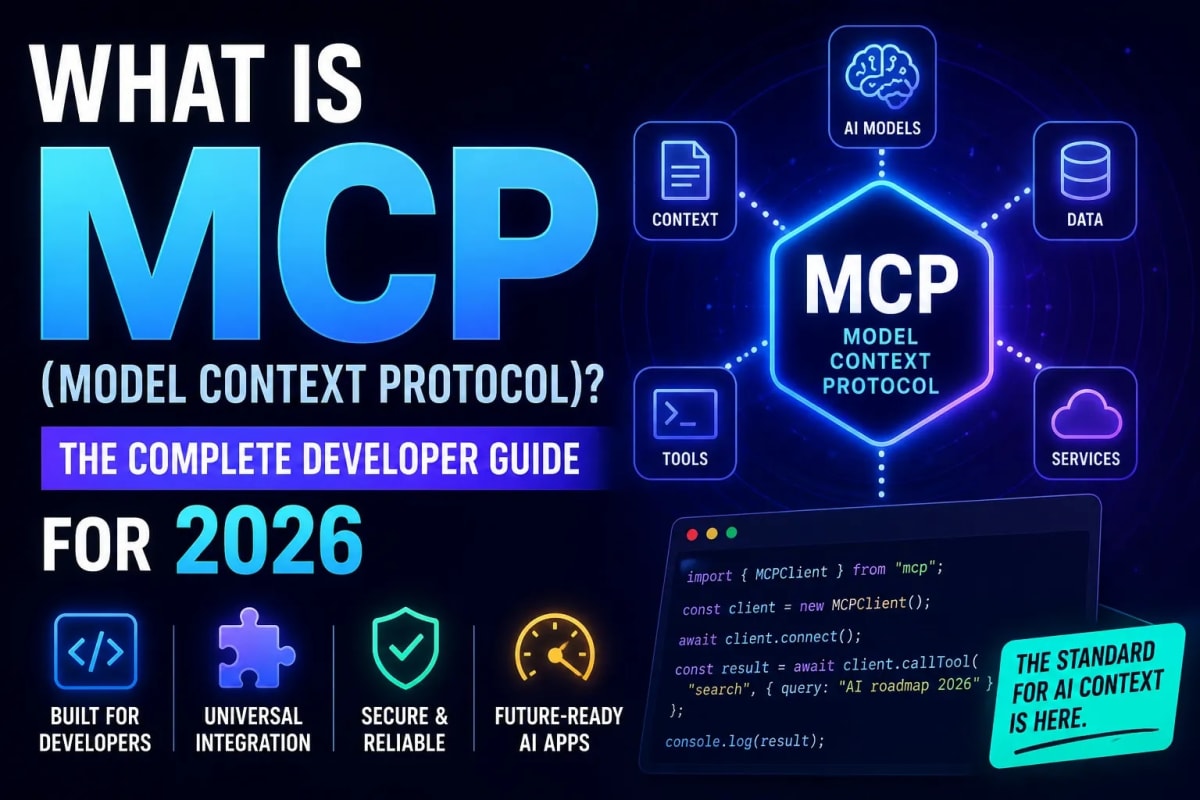
In March 2026, the Model Context Protocol crossed 97 million monthly SDK downloads up from roughly 2 million when it launched in November 2024. That is 4,750% growth in 16 months. For comparison, the React npm package took approximately three years to reach comparable numbers. OpenAI, Google, Microsoft, and AWS have all adopted it. Google announced WebMCP a web-native version of the standard at I/O 2026 just this week. If you build AI-powered applications and you are not yet using MCP, this guide explains what it is, why it took over, and exactly how to start using it today.
What Is MCP? The Plain-English Explanation
MCP Model Context Protocol is an open standard that defines how AI models connect to external tools, data sources, and services. Before MCP, every AI integration was custom-built. Want your AI assistant to query a PostgreSQL database? You wrote a custom function. Want it to read a GitHub issue? Different custom wrapper. Want it to check a Slack thread, search your Notion workspace, and trigger a Stripe refund all in one conversation? You built each connection individually, and none of them worked with any other AI model without rewriting everything.
MCP solves this with a single, universal protocol. The idea is elegant: instead of every AI application building custom integrations for every tool (an N×M problem that scales badly), MCP turns it into N+M. You build a server once that exposes your tool or data source using the MCP standard. Any AI application that supports MCP can then use that server without custom code on either side.
The most common analogy is USB-C for AI. The standard defines the connector. Any device that supports it can plug in to any compatible accessory. You do not need a different cable for every device pair. MCP is that cable except for AI models and the tools they need to access.
Why MCP Won So Fast
MCP launched in November 2024 as an Anthropic open-source project, and it had every reason to fail. New standards proposed by a single company rarely achieve universal adoption the history of technology is littered with protocols that died because they were too closely associated with one vendor's interests. MCP beat those odds through a sequence of adoption milestones that removed the main objections developers had.
OpenAI adopted MCP in April 2025, which was the single most important moment in the protocol's history. OpenAI's endorsement proved MCP was not a proprietary Anthropic tool it was a genuine industry standard. Microsoft integrated it into Copilot Studio in July 2025. AWS added support in November 2025. By March 2026, every major AI provider was on board, and Anthropic donated MCP governance to the Agentic AI Foundation under the Linux Foundation permanently removing the single-vendor risk that had kept some enterprise teams waiting.
Then Google announced WebMCP at I/O 2026 last week a web-native adaptation of the standard that brings MCP into the browser through an open web standard origin trial in Chrome 149. MCP is now moving from developer tool infrastructure into the browser itself. The protocol's trajectory is clear: it is becoming foundational internet infrastructure for the agentic web, not just a useful tool for AI developers.
How MCP Works: The Technical Model
MCP uses a client-server architecture over JSON-RPC 2.0. There are three actors: the host (an AI application like Claude Desktop, Cursor, or your own app), the client (the MCP layer inside the host that manages connections), and the server (the process that exposes tools, resources, or prompts to the AI).
The protocol defines exactly three primitives nothing more, nothing less. Tools are actions the AI can execute: run a database query, send an API request, write a file. Resources are read-only data the AI can access: file contents, database records, documentation. Prompts are reusable templates that surface pre-built instructions into the AI's context. Every MCP integration maps to one or more of these three primitives.
Two transport options exist for connecting clients to servers. The stdio transport runs the MCP server as a local subprocess ideal for desktop applications and development environments like Cursor. The HTTP with Server-Sent Events transport runs the server as a remote process over a standard HTTP connection the right choice for cloud deployments, multi-user applications, and production SaaS integrations. Both transports use identical JSON-RPC payloads, which means the same server code works for both with minimal configuration changes.
When the host connects to a server, it runs a capability negotiation handshake the server declares which tools, resources, and prompts it offers, and the host learns what is available. From that point, the AI can invoke any declared tool naturally within a conversation, and the protocol handles the request routing, response parsing, and error handling automatically.
MCP vs Function Calling: What Is the Difference?
If you have built AI applications using OpenAI function calling or Anthropic tool use, you already understand the core concept behind MCP. The important difference is scope and portability. Function calling is a feature of a specific model API it defines how a single model invokes tools within a single application. MCP is a protocol that sits above any individual model API and standardizes tool integration across the entire AI ecosystem.
A practical illustration: you build a GitHub MCP server. Cursor can now use it to read issues while you code. Claude Desktop can use it to answer questions about your repository. Your own Next.js AI application can use it to give users repo context. Your Slack bot can use it to surface PR status in channels. One server implementation, used everywhere with no changes to the server itself regardless of which AI client connects. That is the portability function calling cannot provide because it is scoped to a single model integration.
The MCP Ecosystem in 2026
As of early 2026, more than 10,000 public MCP servers exist across registries. The community has built servers for practically every tool a development team uses: GitHub, GitLab, Slack, Notion, Linear, Jira, PostgreSQL, MongoDB, Redis, Stripe, Twilio, Figma, Docker, Kubernetes, AWS services, Google Workspace, and hundreds more. For most integration needs in 2026, you do not need to build a server from scratch you find an existing one, review its code, and configure it.
The quality of community servers varies significantly, as it does in any package ecosystem. Before connecting any MCP server to an application that handles sensitive data or credentials, read the source code. An MCP server has access to everything you configure it to access treat it with the same scrutiny you would apply to any third-party dependency in a production application.
The deployment time improvement for teams that migrate to MCP is concrete. One team that migrated from custom OpenAI function-call wrappers to a fully MCP-native architecture reported that deployment time for new tool integrations dropped from three days to eleven minutes. That compression from days to minutes is representative of what the protocol's standardization enables at the integration layer.
⚡ Write Better AI Agent Prompts — Free Tool
How to Build Your First MCP Server
Building an MCP server is straightforward if you are comfortable with TypeScript or Python. The official SDK handles the protocol mechanics your job is defining the tools, resources, and prompts your server exposes. Here is the minimal structure of a TypeScript MCP server:
import { McpServer } from "@modelcontextprotocol/sdk/server/mcp.js";
import { StdioServerTransport } from "@modelcontextprotocol/sdk/server/stdio.js";
import { z } from "zod";

const server = new McpServer({ name: "my-server", version: "1.0.0" });

// Define a tool
server.tool(
  "get_weather",
  "Fetch current weather for a city",
  { city: z.string() },
  async ({ city }) => {
    const data = await fetchWeatherAPI(city);
    return { content: [{ type: "text", text: JSON.stringify(data) }] };
  }
);

// Start the server on stdio transport
const transport = new StdioServerTransport();
await server.connect(transport);
The pattern is consistent regardless of what your tool does: define the name, description, input schema (Zod works perfectly here for TypeScript type safety), and the async handler that performs the actual work and returns content. The SDK handles marshaling the JSON-RPC messages, capability negotiation with clients, and error propagation.
For remote HTTP servers the production deployment model for multi-user applications swap StdioServerTransport for the SSE transport and deploy the server as a standard Node.js HTTP service. Vercel, Railway, and Cloud Run all work without any MCP-specific configuration. If you want a deeper technical walkthrough of how autonomous agents use tools like MCP servers in practice, our guide on building autonomous AI agents in Node.js with function calling covers the execution model that MCP sits on top of.
MCP and AI Agents: Why They Are Inseparable
MCP matters most in the context of AI agents systems that take multi-step actions autonomously rather than just responding to a single prompt. An agent without access to external tools is a language model. An agent with MCP servers is an autonomous system that can read your database, check a status page, create a Jira ticket, send a Slack message, and write a summary to Notion all in a single task run, without a human involved at each step.
The architecture that makes this possible is straightforward: the agent host maintains connections to multiple MCP servers simultaneously, and the AI model can invoke tools from any of them within a single context window. A task that involves querying your database, checking a Stripe subscription status, and drafting a customer email can now be handled by one agent with three MCP server connections instead of three separate custom integrations.
Understanding the broader architecture of how agents orchestrate these tool calls and how to design agent workflows that are safe and reliable in production is essential before building anything significant on top of MCP. Our deep-dive on autonomous AI agents and agentic workflows covers the design patterns, failure modes, and safety considerations that apply directly to MCP-powered agent systems.
MCP for Context-Aware Applications
Beyond agents, MCP is increasingly being used to solve the context problem in AI applications how do you give an AI model accurate, up-to-date information about your specific domain without fine-tuning or embedding an entire knowledge base into every prompt? MCP resources are the answer: a live connection to your data source that the AI can query on demand, without pre-loading everything into context.
This pattern sometimes called retrieval-augmented generation with live tool access rather than a static vector store is more accurate and more maintainable than traditional RAG for many use cases. If you are building applications that need real-time context from your own data sources, our guide on building context-aware AI with Next.js, RAG, and vector databases covers when static retrieval is the right choice and when live tool access via MCP is a better fit.
Security: What You Must Get Right
MCP's security model places responsibility on the host, not the protocol itself. The protocol defines the communication standard; it does not enforce what an AI agent is allowed to do with a connected server. That means you, as the developer building the host or the server, are responsible for scoping permissions correctly.
The key principles for production MCP deployments are: use the minimum permission scope necessary (a server that only needs to read data should never have write access), validate all inputs from the AI before executing tool calls against real systems, log every tool invocation for auditability, implement rate limiting on server endpoints to prevent runaway agent loops, and never expose credentials or secrets through MCP resource endpoints only through scoped, authenticated tool calls.
The most common mistake in early MCP implementations is treating the AI's tool call requests as trusted inputs. They are not. An AI model can be manipulated through prompt injection to invoke tools in unintended ways. Build your MCP servers with the same defensive posture you would apply to any API endpoint that accepts user-controlled input. For the broader context on how Google is standardizing MCP for the web, our breakdown of Google I/O 2026 developer announcements covers the WebMCP origin trial and what it means for browser-based AI integrations.
Frequently Asked Questions
What is MCP (Model Context Protocol) in simple terms?
MCP is an open standard that lets AI models connect to external tools and data sources using a universal protocol instead of custom integrations. Think of it as USB-C for AI: build one server that exposes your tool using the MCP standard, and any AI application that supports MCP can use it without additional code. It was created by Anthropic in November 2024, adopted by OpenAI, Google, Microsoft, and AWS, and reached 97 million monthly SDK downloads by March 2026.
What is the difference between MCP and a regular REST API?
A REST API is a way for applications to communicate over HTTP using standard verbs and endpoints. MCP is specifically designed for AI-to-tool communication it includes capability negotiation so AI models know what a server can do, structured tool and resource primitives that map to how LLMs think about taking actions, and JSON-RPC messaging that handles the request-response cycle in a way that integrates naturally with AI model context windows. An MCP server often wraps an existing REST API and exposes it in a format AI agents can use directly without custom prompt engineering for each endpoint.
Do I need to build my own MCP server or can I use existing ones?
For most common tools, you can use an existing community-built MCP server. As of early 2026, more than 10,000 public MCP servers exist across official and community registries, covering tools like GitHub, Slack, PostgreSQL, Notion, Stripe, Docker, and hundreds more. You typically clone the server, configure it with your credentials, and point your MCP client at it. Build your own server when you need to expose a proprietary internal system, a custom database schema, or a tool that does not have a quality community implementation yet.
Is MCP safe to use in production applications?
MCP can be used safely in production with the right implementation practices. The protocol's security model places responsibility on the host and server developers the protocol defines communication, not permissions. Key production requirements include minimum-scope access control for each server, input validation on all tool call parameters before executing against real systems, complete logging of tool invocations, rate limiting to prevent runaway agent behavior, and treating AI-generated tool call requests with the same defensive posture you apply to any user-controlled input.
What is WebMCP and how is it different from MCP?
WebMCP is a web-native adaptation of the Model Context Protocol announced by Google at I/O 2026. Where MCP is primarily a server-to-model integration standard for desktop applications and API-level AI integrations, WebMCP is a proposed browser standard that allows web developers to expose JavaScript functions and HTML forms as structured tools directly in the browser so browser-based AI agents can interact with web applications with precision instead of relying on brittle DOM parsing. The experimental origin trial begins in Chrome 149. WebMCP is to browser-based AI agents what MCP is to desktop and API-level agents.
Tagged in
Continue Reading
All Articles


Level Up Your Workflow
Free tools mentioned in this article
CSS to Tailwind CSS Converter
Convert legacy CSS to modern Tailwind CSS utility classes instantly. 100% secure, free, and runs entirely in your browser. Boost your core web vitals today.
PX to EM Converter
Convert pixels to em and em to px with customizable parent font size. Free, instant, local calculation, copy-ready CSS snippets & Tailwind classes.
Bcrypt Generator & Verifier
Generate and verify Bcrypt password hashes instantly in your browser. A secure, client-side Bcrypt hash calculator for developers with zero backend logs.
Stripe & PayPal Fee Calculator
Calculate the exact Stripe and PayPal transaction fees for US and UK markets. A free developer tool to estimate SaaS payouts, merchant costs, and revenues.